Preview image. Unlock full-res
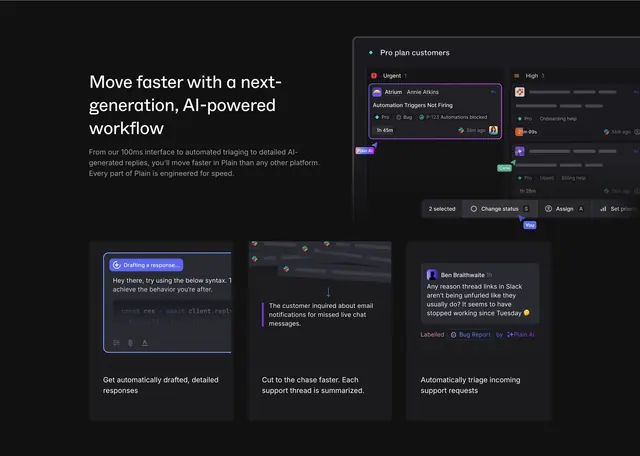
Dark feature section with headline, large triage dashboard mockup, and three cards for AI drafts, thread summaries, and auto-labeling.
Summary
A dark homepage AI section pairing a left headline about speed with a large Pro plan customers triage UI on the right and three bottom cards explaining drafts, summaries, and automatic triage.
Visual description
Deep charcoal background. Top-left: white headline Move faster with a next-generation, AI-powered workflow and gray paragraph about 100ms interface, automated triaging, and AI-generated replies. Top-right: large dark dashboard mockup titled Pro plan customers with Urgent and High columns, ticket from Annie Atkins about Automation Triggers Not Firing, Bug and P-123 labels, Plain AI badge, collaboration cursors labeled Carla and You, and bottom action bar for 2 selected with status, assign, and priority shortcuts. Bottom row three cards: left shows Drafting a response UI with code snippet in reply; middle shows blurred messages collapsing into a one-line thread summary; right shows incoming request auto-labeled Bug Report by Plain AI. Each card has a short white caption below the mockup.
Key takeaway
Leading with a realistic inbox triage screenshot proves speed claims better than abstract AI graphics. Breaking AI into three concrete jobs (draft, summarize, label) avoids a vague intelligence pitch. Purple Plain AI badges create a consistent AI sub-brand inside product UI.
Reuse notes
Ideal for support or ops SaaS selling AI as workflow acceleration, not chat novelty. Requires credible dark UI mockups with readable ticket detail. Best on dark sections adjacent to lighter product pages; purple accent should stay sparse.