Preview image. Unlock full-res
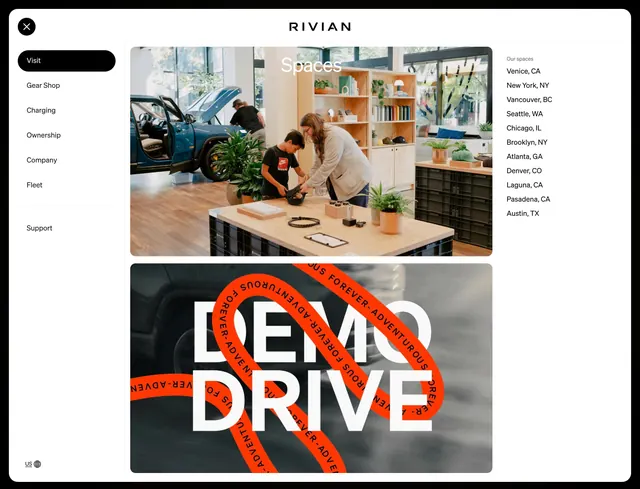
Full-screen light mega menu with left nav rail, two stacked visit promo tiles, and a right column of store locations.
Summary
Full-screen light mega menu with left nav rail, two stacked visit promo tiles, and a right column of store locations.
Visual description
White full-viewport overlay menu. Top center RIVIAN wordmark; circular close X top left. Left rail lists Visit in a black pill as active, then Gear Shop, Charging, Ownership, Company, Fleet, and Support in plain black text; US globe selector at bottom left. Center column stacks two large rounded tiles: top photo of a bright Rivian Space showroom with Spaces headline in white; bottom tile with blurred motion background, massive white DEMO DRIVE type, and an orange looping ribbon graphic repeating ADVENTUROUS FOREVER. Right column lists Our spaces heading in gray and a vertical city list from Venice CA through Austin TX.
Key takeaway
Split the mega menu into nav rail, two visual promo tiles, and a scannable location index so visit intent gets both inspiration and practicality. Use one photographic tile and one typographic graphic tile to vary energy without breaking the grid. Active nav item as a black pill mirrors Rivian's product nav language.
Reuse notes
Strong for automotive, retail, or experiential brands with physical locations plus a flagship action like demo drive. Needs two strong promo visuals and a maintainable city list. Full-screen takeover works on light backgrounds; ensure close control stays obvious top left.
More navbar sections
See all




More like this

Keep what you find
A free account saves references to boards and can send you a weekly email of picks based on what you save.
To see every result, go Pro.