Preview image. Unlock full-res
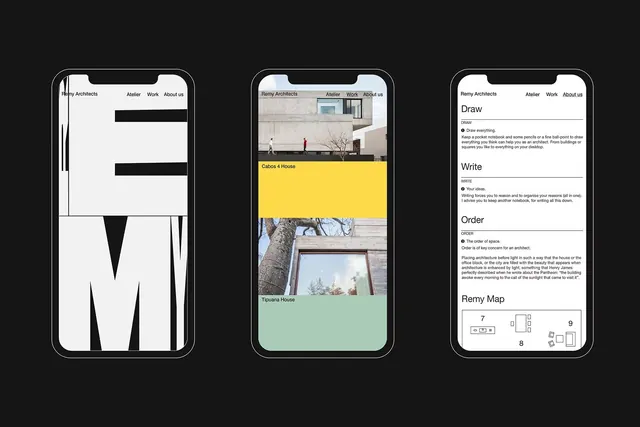
Architecture portfolio app UI with monochromatic navigation, photo grid, and feature modules set in three unified iPhone mockups.
Summary
A portfolio app for an architecture studio showing three distinct screens: a minimalist project list, a hero image with metadata label (yellow accent bar), and interactive feature buttons (Draw, Write, Order).
Visual description
Three iPhone mockups arranged horizontally on a dark background, each showing a different screen state. Left screen is spare: navigation header (Remy Architects, Atelier, Work, About us) with two stacked black bars below. Center screen displays a hero photo (residential architecture with figures, tree, concrete facade) topped by a navigation bar and overlaid with a yellow label (Cabos 4 House) and secondary image (Tipuana House in mint green). Right screen lists three action modules (Draw, Write, Order) as text-heavy sections with explanatory copy and a small diagram labeled Remy Map with numbered grid. All screens use a clean sans-serif, black bars for emphasis, and strategic color (yellow, mint) to highlight content.
Key takeaway
The color restraint: a mostly monochromatic palette punctuated by two accent colors (yellow + mint-green) to organize and highlight distinct content zones without clutter. The left-side minimalist listing paired with the center's immersive image-first experience creates a strong contrast between navigation and showcase.
Reuse notes
Effective for portfolio/agency apps that need to balance browsing and storytelling. The yellow and mint green accents work well on neutral backgrounds; consider testing saturation on light-background variants. The three-column mockup layout itself is a useful composition for showing feature breadth without text overload.
More like this
Keep what you find
A free account saves references to boards and can send you a weekly email of picks based on what you save.
To see every result, go Pro.