Preview image. Unlock full-res
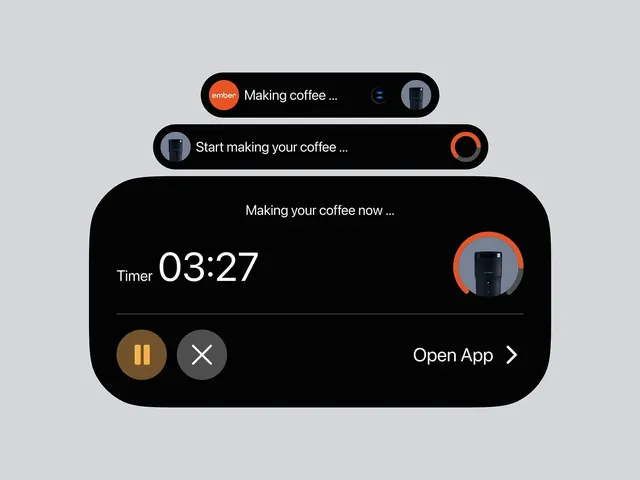
Dark-mode smart-home notification widget for a coffee maker, combining progress tracking, device icons, and timer display in a rounded card UI.
Summary
Dark-mode smart-home notification widget for a coffee maker, combining progress tracking, device icons, and timer display in a rounded card UI.
Visual description
Three stacked horizontal cards on a light-gray background. Top card (darker, in-progress state): black rounded bar with orange circle, white headline text "Making coffee", and a small device icon on the right. Middle card: similar layout with a large orange progress ring on the right and text "Start making your coffee". Bottom card (active state): black rounded rectangle with "Making your coffee now" header, a white timer display reading 03:27, a large circular orange progress indicator on the right showing ~30% complete, a thin divider line, and a pair of action buttons below (pause in tan, cancel in gray) plus an "Open App" link. All text is white sans-serif, left-aligned; icons are device mockups in gray and orange tones.
Key takeaway
The stacked notification pattern with visual state changes (colors and ring progress) that clearly communicates status without text redundancy. The orange accent color provides warmth against black/white. The pairing of icon thumbnails with text creates fast visual scanning for quick actions.
Reuse notes
Best for smart-home app notifications, fitness/health timers, or cooking apps. The pattern scales to mobile lock-screen or notification-center cards. The warm accent works well with neutral dark-mode backgrounds.
More like this
Keep what you find
A free account saves references to boards and can send you a weekly email of picks based on what you save.
To see every result, go Pro.