Preview image. Unlock full-res
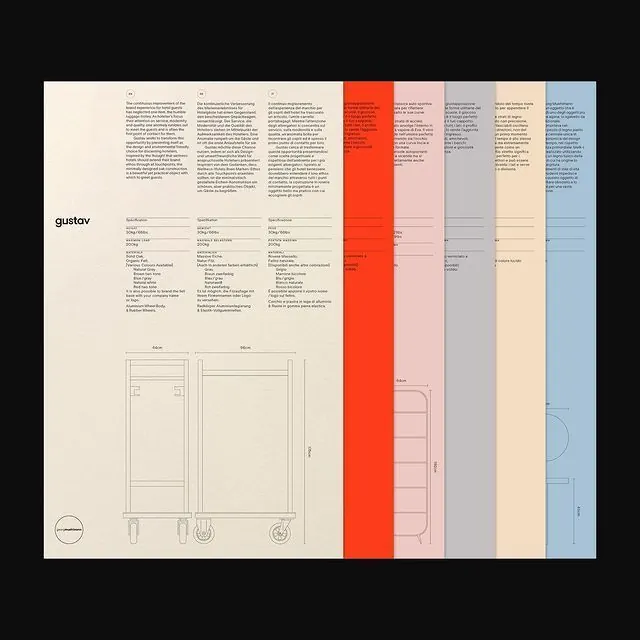
A technical furniture specification sheet using vertical color-coded accent bars and left-aligned text blocks to organize product documentation and dimensional drawings across five distinct variants.
Summary
A technical furniture specification sheet using vertical color-coded accent bars and left-aligned text blocks to organize product documentation and dimensional drawings across five distinct variants.
Visual description
Left half displays dense typographic documentation: specification tables, material lists, and technical notes set in a single sans-serif column with tight line-height. At left margin sit small circular logo marks and measurement guidelines. Right half is dominated by two full-height technical drawings of furniture pieces (appears to be storage units or cabinets) rendered in brown line-art with dimensional annotations. Five vertical color bars run from top to bottom on the right edge (bright red/orange, soft pink, cool gray, cream/beige, and soft blue), each corresponding to a product variant or configuration. Cream background (EBE2D2) with black type and gray subtext. Composition is strictly grid-based with heavy emphasis on information hierarchy and systematic organization.
Key takeaway
Vertical color-coding as a scannable way to show variants without doubling the page count. Separating technical drawings from text documentation spatially (left vs right) creates cognitive clarity. Using typeface weight and size alone for hierarchy rather than color shifts for body copy maintains legibility and formality.
Reuse notes
Essential reference for product specification sheets, design systems documentation, or technical catalogs requiring multi-variant comparison. The color-bar system scales to many variants and is especially effective in print. Works best when the color logic is explained elsewhere in the document (e.g., a key page) so users can decode the bars quickly.
More like this


Keep what you find
A free account saves references to boards and can send you a weekly email of picks based on what you save.
To see every result, go Pro.