Preview image. Unlock full-res
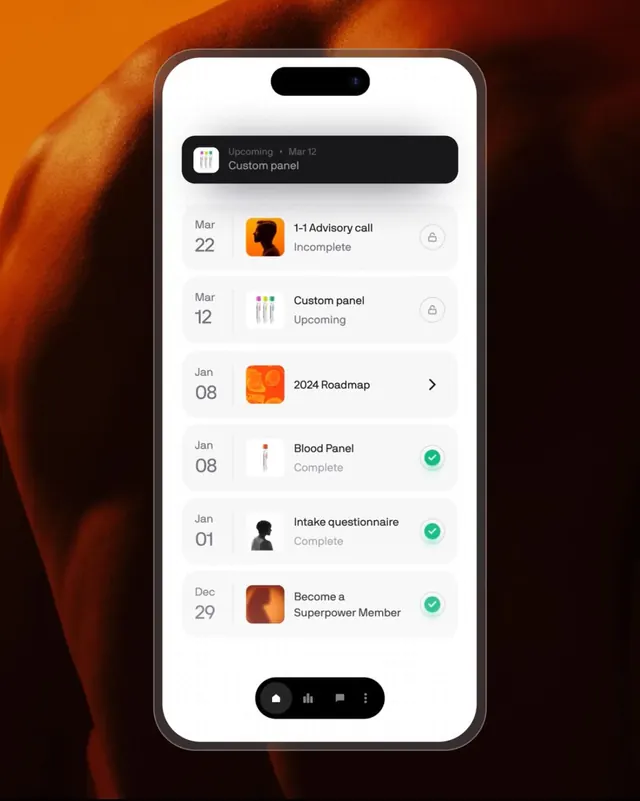
A task-management mobile interface featuring a chronological timeline of events with color-coded completion states and icon badges against a warm orange gradient background.
Summary
A mobile task-management interface displaying upcoming events and assignments in chronological order with visual status indicators (icons, completion checkmarks, lock badges) against a warm orange gradient background.
Visual description
White card-based layout on a rich orange-to-dark-brown gradient background. The interface displays a scrollable list of dated tasks, each row showing a date column (left), small icon badge (task type: calendar, checklist, roadmap, blood test, avatar, wellness), task title and status label (uppercase "Upcoming", "Complete", "Incomplete"), and a right-side indicator (checkmark, lock icon, or navigation arrow). Clean sans-serif typography with light gray status text. Horizontal dividers separate rows. Navigation bar at bottom with four dark-background pill-shaped icons (home, chart, message, menu).
Key takeaway
The date column (left-aligned, large dates, gray) creates a narrative timeline without clutter. Color-coded status indicators (green checkmark for done, closed-lock for restricted, orange badge for in-progress) communicate at a glance without text. Icon badges give each task visual identity in small space.
Reuse notes
Strong pattern for task/appointment apps and health tracking interfaces. The warm gradient background elevates minimalist card interfaces. Works well when you have heterogeneous tasks (different types, dates, statuses) but want clarity and breathing room.
More like this

Keep what you find
A free account saves references to boards and can send you a weekly email of picks based on what you save.
To see every result, go Pro.