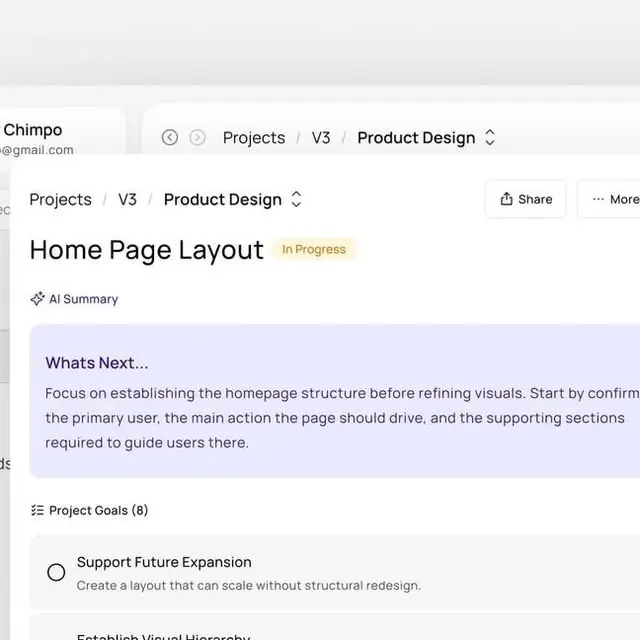
Preview image. Unlock full-res
Minimal design tool interface showing a project layout section with an in-progress task card and project goals list below.
Summary
A minimal software interface showing a project management section with task cards, contextual status badges, and an expandable goals checklist, emphasizing clarity through whitespace and restrained color.
Visual description
A single-column layout with top breadcrumb navigation (Projects / V3 / Product Design) and section title "Home Page Layout" marked "In Progress" with a soft purple badge. Below, a light purple information card ("Whats Next...") contains instructional text about establishing homepage structure. Further down, a collapsible "Project Goals (8)" section shows a checklist structure with goal entries and their descriptions. The entire interface uses a neutral palette of whites, light grays, and cool blues for interactive elements, with generous padding between sections and clear visual hierarchy through font weight contrast.
Key takeaway
The use of subtle colored backgrounds (the purple card) to differentiate instruction from primary content without using borders or heavy visual weight. The breadcrumb hierarchy combined with status badges that pack metadata into minimal space. The clean alignment of list items with clear left-edge structure for scanability.
Reuse notes
Strong for SaaS dashboards, project management tools, design platforms, and any interface prioritizing task clarity over decoration. The muted purple accent pair well with light backgrounds. Works particularly well for tools with nested projects and goal-tracking features.
More like this

Keep what you find
A free account saves references to boards and can send you a weekly email of picks based on what you save.
To see every result, go Pro.