Preview image. Unlock full-res
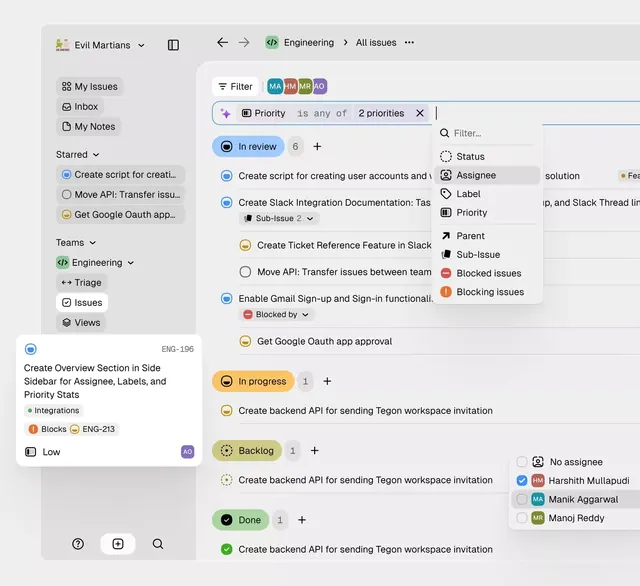
A project management interface showing a filterable task list with color-coded status badges and a hierarchical left sidebar navigation.
Summary
An issue tracker dashboard with a persistent left sidebar, expandable team/project groupings, and a main content area displaying filterable task cards with status and assignee indicators.
Visual description
The interface divides into two columns. Left sidebar presents a collapsible navigation tree: a breadcrumb showing the current view (Evil Martians > Engineering > All Issues), then sections for My Issues, Inbox, and My Notes, followed by expandable team groupings (Engineering, Triage) with sub-items. The right main area displays a filter bar with multiple colored avatars and a priority constraint pill ("Priority is any of 2 priorities"). Below, task cards stack vertically, each showing an icon (status symbol), task title, metadata (sub-issue count, assignee blockers), and a pill badge indicating workflow state (In Review, In Progress, Backlog, Done). Accent colors (blue for In Review, orange for In Progress, green for Done) provide visual scanning. The secondary filter menu slides out from the right edge, showing filter options like Status, Assignee, Label, and Priority. Typography is clean sans-serif throughout, favoring contrast for scannability. The layout is optimized for rapid task navigation and filtering.
Key takeaway
The layered filter affordance (the priority pill shows both filter state and action). How status badges use consistent, saturated hues without breaking the muted background. The sticky sidebar letting users navigate while viewing results. The balanced use of icons and text labels.
Reuse notes
Reference for any task-management or data-heavy software UI. The pattern works well for healthcare records, CRM dashboards, and internal tools. Assignee avatars and status badges are the key visual vocabulary. Sidebar collapsing is essential for mobile/responsive handling.
More like this


Keep what you find
A free account saves references to boards and can send you a weekly email of picks based on what you save.
To see every result, go Pro.