Preview image. Unlock full-res
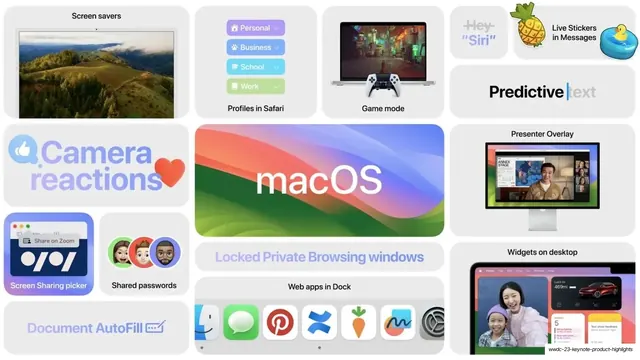
White bento mosaic of macOS features around a central "macOS" wordmark on the blue-green-pink Sonoma gradient tile.
Summary
The macOS recap slide: a bento wall of Mac feature tiles around a large center tile carrying the lowercase "macOS" wordmark over the blue-green-pink Sonoma gradient.
Visual description
Light-gray field of white rounded tiles. The center hero tile is the Sonoma wavy gradient (blue, green, pink) with "macOS" in heavy white lowercase. Surrounding tiles each hold a feature: a "Screen savers" tile with a rolling-hills aerial photo, a "Profiles in Safari" tile listing Personal / Business / School / Work dropdown rows in colored pills, a "Game mode" tile with a laptop running a dark game and a game controller, a "Hey Siri" tile (ghost-gray text), a "Live Stickers in Messages" tile with a pineapple and rubber-duck sticker, a "Camera reactions" tile with a thumbs-up and heart, a "Presenter Overlay" tile showing a speaker composited over a slide, a "Screen Sharing picker" window, a "Shared passwords" tile with three Memoji, a gradient "Locked Private Browsing windows", a "Web apps in Dock" tile with a row of app icons (Finder, Messages, Pinterest, and others), a "Widgets on desktop" iPad-style screen, and a "Document AutoFill" tile. Type is SF Pro: oversized wordmark, small dark labels, some gradient and ghost-gray label treatments. Imagery is live UI screenshots and icons on white, color driven by the central gradient.
Key takeaway
The repeated OS-overview formula seen on the watchOS and iPadOS slides applied to the Mac: one big brand-gradient name tile anchoring a grid of equal-radius feature tiles. Showing software features as live UI crops (Safari profiles, Web apps in Dock, Presenter Overlay) rather than icons, which reads as "real and shipping". Colored dropdown pills and Memoji adding accent color without leaving the grid.
Reuse notes
The default layout for a desktop-OS or software "what's new" overview that must fit many features on one slide. Best in light mode with the single brand gradient as the only loud element. Demands a real spread of clean UI screenshots; placeholder content leaves empty tiles. The blue-green-pink wave is the macOS Sonoma wallpaper; swap for your own brand gradient.
From this deck: macOS Sonoma bento feature wall
View deck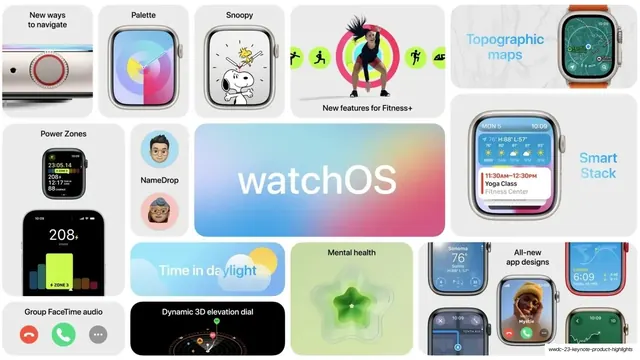



More like this







Keep what you find
A free account saves references to boards and can send you a weekly email of picks based on what you save.
To see every result, go Pro.