Preview image. Unlock full-res
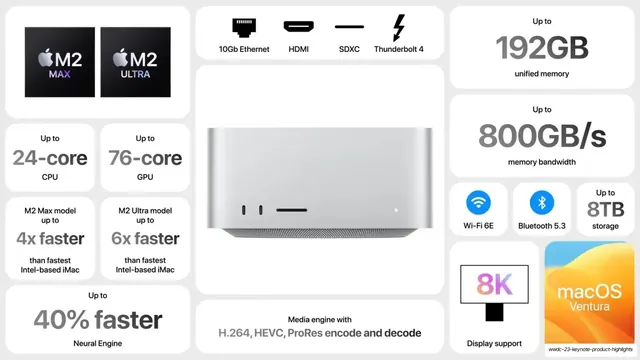
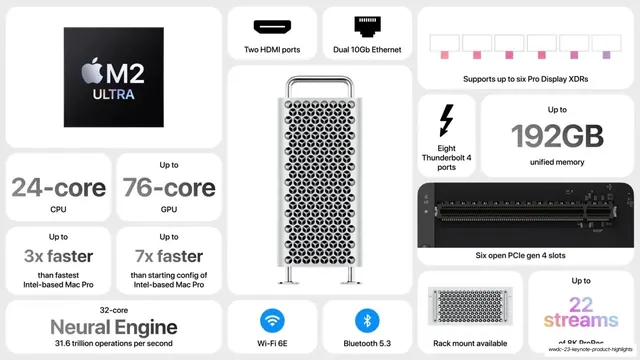
White bento spec wall centered on the silver Mac Studio render, with M2 Max/Ultra chip tiles, gray spec figures, and I/O glyphs.
Summary
The Mac Studio spec slide: the compact silver Mac Studio render sits center while white tiles around it carry two chip tiles, gray spec figures, I/O icons, and connectivity badges.
Visual description
Light-gray field of white rounded tiles. The center tile holds a photoreal silver Mac Studio (the short cylinder-cornered desktop block with front ports). Top-left a single wide tile pairs two black chip squares: "M2 MAX" (purple accent) and "M2 ULTRA" (silver). Spec tiles in solid gray: "Up to 24-core CPU", "Up to 76-core GPU", "M2 Max model up to 4x faster than fastest Intel-based iMac", "M2 Ultra model up to 6x faster than fastest Intel-based iMac", "Up to 40% faster Neural Engine", "Up to 192GB unified memory", "800GB/s memory bandwidth". I/O row up top uses glyphs: "10Gb Ethernet", "HDMI", "SDXC", "Thunderbolt 4". Connectivity badges: blue Wi-Fi "Wi-Fi 6E", blue Bluetooth "Bluetooth 5.3", "Up to 8TB storage". A "Media engine with H.264, HEVC, ProRes encode and decode" tile, an "8K Display support" tile with a gradient "8K" on a monitor glyph, and a bottom-right "macOS Ventura" tile showing the orange-blue Ventura wallpaper. Type is SF Pro, oversized gray numerals over small dark labels; nearly monochrome except blue radios, a pink/gradient "8K", and the Ventura tile.
Key takeaway
Reusing the exact same spec-wall template as the Mac Pro slide but swapping the center render and the chip lockups, demonstrating how one bento layout scales across a product line for a consistent family look. The two-chip tile as a compact way to show "available in two configs". The single colorful wallpaper tile (Ventura) as a quiet pointer to the OS without disrupting the gray grid.
Reuse notes
Ideal when several products in a lineup each need their own spec slide and you want them to feel like a set. Reusable as a desktop or workstation spec / I/O wall. Keep the template fixed and vary only the hero render, chip tiles, and figures. As with the other hardware slides, it needs a clean product render and a real set of specs to fill the grid.
From this deck: Mac Studio spec bento
View deck

More like this




Keep what you find
A free account saves references to boards and can send you a weekly email of picks based on what you save.
To see every result, go Pro.