Preview image. Unlock full-res
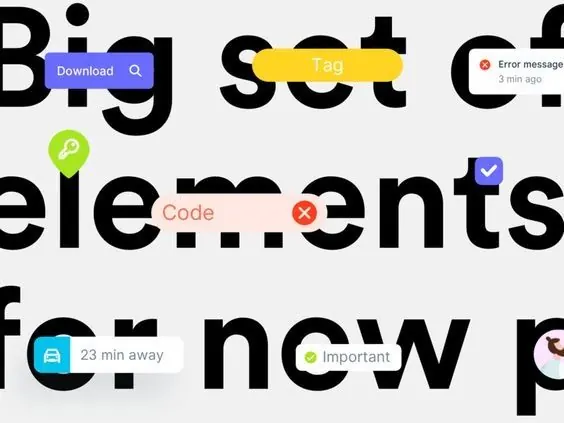
Large-scale display typography layered with colorful functional badges and labels demonstrating clear information hierarchy through visual contrast.
Summary
Bold display type with embedded functional badges (tags, error messages, time labels, checkmarks) demonstrating how color coding and iconography direct attention within dense text layouts.
Visual description
Large bold sans-serif text (appears black on light gray background) is layered with small colorful labels positioned inline or near-adjacent: a purple "Download" button with search icon, bright yellow "Tag" pill-badge, a red circular error indicator (with timestamp "3 min ago"), green checkmark badge, red "X" cancel icon with orange "Code" label, teal folder icon with "23 min away" time reference, and a yellow-green "Important" indicator. The treatment mixes minimal flat design (solid color badges, no shadows) with functional visual coding (red for error/delete, green for confirm, yellow/gold for info, teal for file types).
Key takeaway
Color-coded functional badges layered directly over text create hierarchical information without disrupting readability. The pairing of circular icon badges with rectangular pill labels (yellow Tag, orange Code) balances shape variety. Using time references (23 min away, 3 min ago) and status icons (checkmark, X, green dot) embed metadata without separate rows.
Reuse notes
Use when layering status, error, or action indicators into text-heavy layouts (task lists, code editors, project boards, file managers). Works best with a monochromatic background (white/light gray) so colored badges pop. Avoid if information is already complex; the badges add visual richness that can overwhelm dense content.