Preview image. Unlock full-res
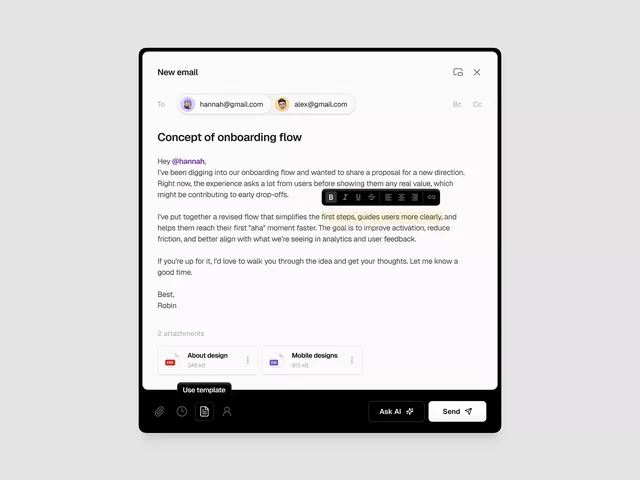
Email composition modal with recipient chips, rich-text editor toolbar, and file attachments, demonstrating a product proposal workflow.
Summary
Email composition modal showcasing a product onboarding proposal sent to team members, with recipient input, rich-text editor, and attachment handling in a single focused interface.
Visual description
A modal dialog with rounded black border occupies most of the viewport. Header bar contains "New email" title left-aligned with minimize and close buttons right-aligned in gray. Below, a "To:" field displays two recipient chips (hannah@gmail.com with avatar, alex@gmail.com with avatar) and shows secondary "Bc" and "Cc" options grayed out. The email subject "Concept of onboarding flow" appears as a bold sans-serif heading. Body text flows in a left-aligned column with single line-height spacing; text includes a mention (@hannah) in accent color and regular body copy discussing the proposal. An inline toolbar appears with formatting buttons (bold, italic, underline, strikethrough, and text-alignment options) positioned mid-scroll. At the bottom, a "2 attachments" label precedes two file cards: "About design" (PDF, 246 kB) and "Mobile designs" (image, 812 kB), each with a more-options menu. Footer contains attachment, scheduling, contact, and info icons left-aligned, and "Ask AI" and "Send" buttons right-aligned. All UI in dark charcoal, white, and light gray. Black and white monochromatic color scheme with minimal accent color.
Key takeaway
Recipient chips with avatars as a visual confirmation mechanism; inline formatting toolbar appearing contextually within the compose area rather than fixed; file attachment previews as compact cards with file metadata; clear visual hierarchy between subject, body, and metadata through typography weight and spacing; the minimal color palette supporting focus on content.
Reuse notes
Appropriate for SaaS product communications, email marketing platforms, and collaborative workspace applications. The onboarding-flow example makes this useful for product-design pattern libraries. Scale this for mobile if needed; the modal is desktop-first. The "Ask AI" button suggests modern AI-assisted composition features.