Preview image. Unlock full-res
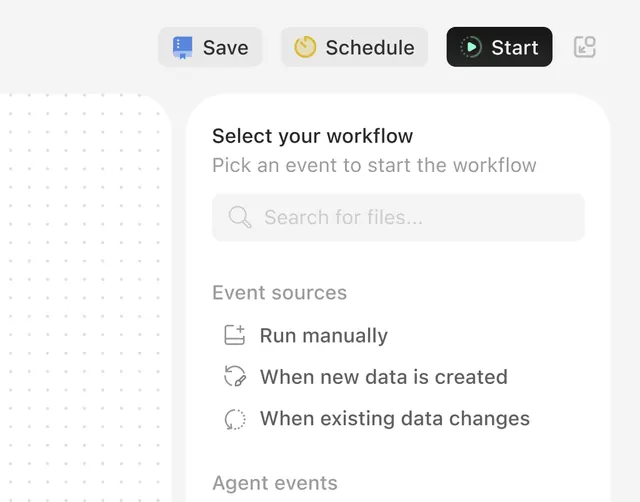
SaaS workflow interface with minimal button navigation and a three-part task setup: search input, event source selection, and agent event triggers.
Summary
Task automation interface prompting users to select a workflow trigger from three event sources: manual execution, data creation events, or data modification events.
Visual description
Light gray background with a white central card. Top navigation shows four gray/white button tabs labeled "Save," "Schedule," "Start," and a copy icon. Card headline reads "Select your workflow" with supporting gray text "Pick an event to start the workflow". Below is a full-width search field with placeholder "Search for files..." and a faint magnifying glass icon. The lower section "Event sources" lists three left-aligned options in linked text style: "Run manually" (document icon), "When new data is created" (curved arrow icon), "When existing data changes" (circular refresh icon). An "Agent events" heading appears at the bottom.
Key takeaway
The clean hierarchy separating top-level action buttons, the primary call-to-action prompt, a search-first interface pattern, and then a structured list of trigger options. The generous whitespace and neutral palette make complex automation setup feel approachable. Icon plus linked text, rather than buttons, keeps the visual weight low.
Reuse notes
Ideal for automation, workflow, or integration products where users must choose between multiple trigger or action sources. The search pattern scales to large option lists. Works best when the trigger set is stable and foreseeable. Not suited for one-off or discovery-heavy flows.