Preview image. Unlock full-res
Mobile chat interface for AI assistance with inline action toolbar, loading states, and Slack integration prompt.
Summary
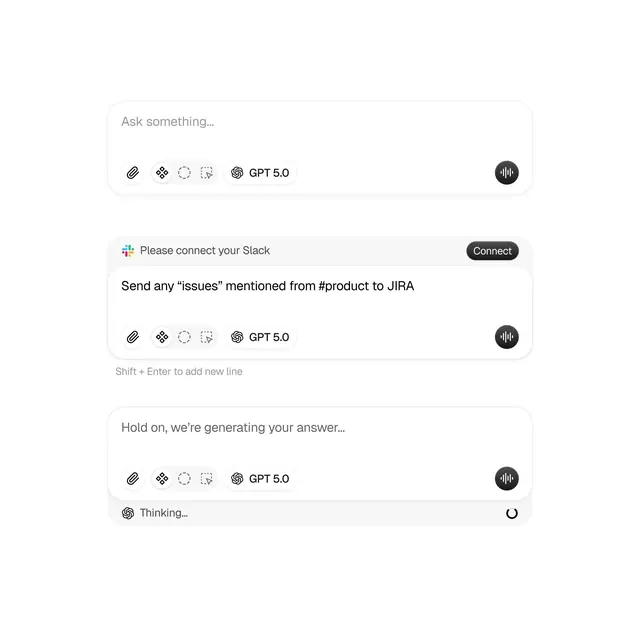
Mobile chat interface for an AI assistant showing an input field with inline action toolbar, three message states (prompt, task description with Slack integration, and processing indicator), and voice controls.
Visual description
Three stacked chat message containers on a light, neutral background. The top input field shows placeholder text "Ask something..." with a toolbar holding six icon buttons (attachment, grid, circle, sparkle, GPT 5.0 branding) and a dark circular voice-control button on the right. The middle card displays a Slack integration prompt with a "Connect" button. The bottom card shows a generating-response state with "Hold on, we're generating your answer..." and a loading spinner with "Thinking..." status. All cards feature rounded corners, light gray dividers, and consistent icon sizing. Type is clean, sans-serif, set in neutral grays with no color variation except the blue GPT logo mark.
Key takeaway
The inline action toolbar inside an input field avoids cluttering the message stream and provides quick access to common actions. The three distinct message types (user input, integration prompt, system feedback) are visually differentiated through content rather than background color, maintaining minimalism. The loading spinner and status label provide clear feedback during processing without animation.
Reuse notes
Ideal for conversational AI products, customer-support chatbots, and developer-facing AI tools. The neutral palette and calm spacing make it feel approachable and trustworthy. Works well for applications that need to surface integrations (Slack, JIRA, etc.) inline.