Preview image. Unlock full-res
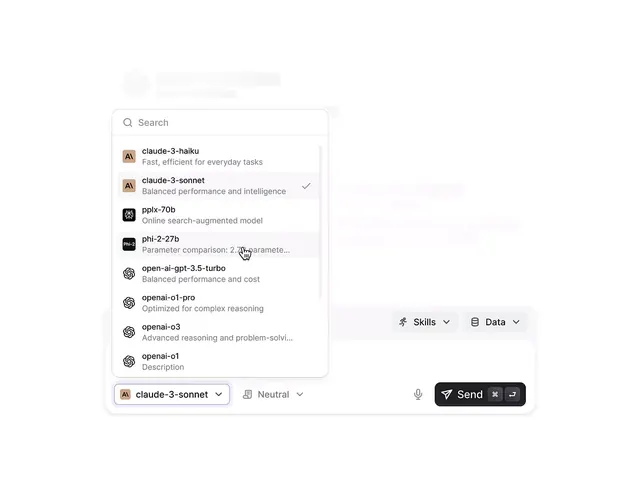
A clean dropdown interface for selecting AI language models, displaying model names, descriptions, and capability indicators in a minimal card layout.
Summary
A minimal model-selection dropdown showcasing LLM options (Claude, GPT, Phi, OpenAI variants) with concise capability descriptions and a checked indicator for the active selection.
Visual description
A white card sits on a light gray background, anchored by a search input at the top. Below flows a scrollable list of nine AI model entries: each has a small avatar badge on the left, followed by a model name in bold sans-serif and a single-line capability description in smaller, muted gray text. One entry (claude-3-sonnet) shows a blue checkmark on the right, indicating the current selection. The list items are vertically stacked with subtle dividers. At the bottom of the card sit two dropdown controls (a selected model button and a "Neutral" tone selector) and a prominent dark "Send" button with keyboard shortcut icons. The overall aesthetic is restrained, functional, and data-focused with ample whitespace.
Key takeaway
Compact, single-line descriptions below model names let users compare options at a glance without overwhelming the interface. The avatar badges (letter or logo) add visual identity to abstract model names. A checked indicator and color accent (blue) make the current selection unmissable without loud design. The bottom action buttons remain stable and visible even if the list scrolls.
Reuse notes
Ideal for AI chat interfaces, prompt engineering tools, or model-selection flows in developer apps. The neutral palette and structured layout suit technical audiences. The pattern scales well to many options and works equally well in modals, sidebars, or full-width forms. Consider adding hover states for better discoverability in interactive prototypes.