Preview image. Unlock full-res
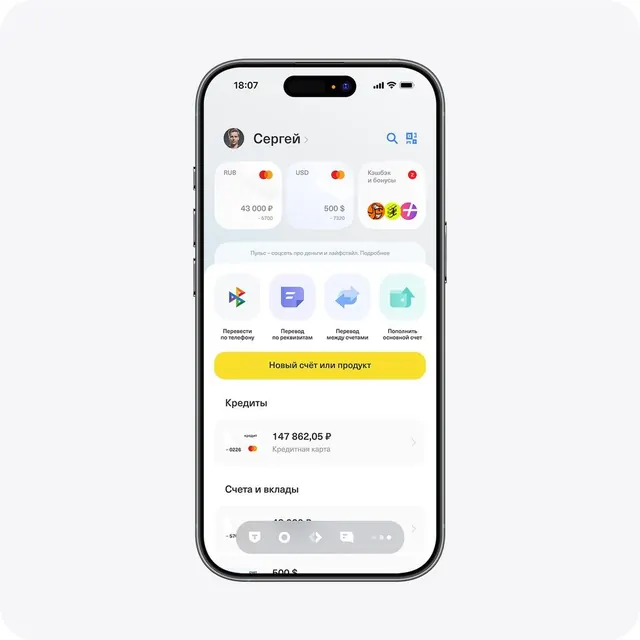
Mobile banking app showing account balances across multiple currencies, transfer options, and payment features in a clean, grid-based layout.
Summary
Mobile banking interface displaying account holder name, multiple currency balances with card badges, action buttons, and account features organized in a hierarchical card-based grid.
Visual description
iPhone mockup showing a fintech dashboard with username "Сергей" at the top left (with avatar) and search/settings icons in the header. Below, a horizontal row displays three account cards showing RUB balance (43,000), USD balance (500), and cashback/rewards status. A descriptive tagline reads "Purse - about money and lifestyle." Four primary action buttons appear in a grid: "Transfers by phone", "Translate by requisites", "Translate between accounts", and "Replenish main account." A bright yellow button spans the width with text "New account or product". Below are sections for "Credits" showing a Mastercard account balance and "Accounts and deposits". The entire layout uses generous whitespace, sans-serif typography, light gray backgrounds for card sections, and subtle dividers.
Key takeaway
The card-based modular layout grouping related data (balances, actions, accounts) into scannable chunks; the use of colored Mastercard badges to visually anchor payment methods; the prominent yellow CTA button for high-intent actions against a neutral palette; icon + label button patterns for secondary actions.
Reuse notes
Strong reference for fintech dashboards, banking apps, and personal finance tools. The multi-currency card display is especially useful for international payment platforms or remittance apps. The action-button grid layout scales well from three to six options. Works best on light backgrounds; the calm, trustworthy color scheme suits regulated financial services.