Preview image. Unlock full-res
Light feature section opening with a centered privacy headline and compliance badges, then two alternating split rows pairing eyebrow copy and a CTA with gradient-framed product screenshots.
Summary
A light alternating-row feature block introduced by a centered "Privacy First, Always" headline with SOC2 and HIPAA badges, then two split rows that swap text and screenshot sides, each with an eyebrow label and its own Get started button.
Visual description
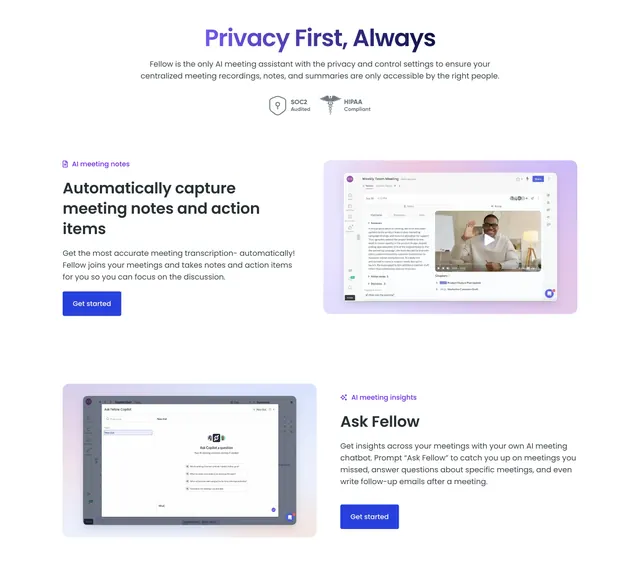
At the top, a centered two-tone headline ("Privacy First, Always" with "Privacy" in violet) sits above two lines of grey sub-copy and two small trust badges, SOC2 Audited and HIPAA Compliant, each with a tiny icon. Below are two feature rows on a white background. The first row has text on the left (a violet "AI meeting notes" eyebrow, the bold headline "Automatically capture meeting notes and action items", body copy, and a violet Get started button) and, on the right, a meeting-recap screenshot with a video thumbnail sitting on a soft pink-to-violet gradient pad. The second row reverses the order: a product screenshot of an Ask Fellow chatbot on a pastel gradient pad on the left, and on the right a violet "AI meeting insights" eyebrow, the bold headline "Ask Fellow", body copy, and another violet Get started button.
Key takeaway
Putting the privacy/compliance badges right under the section headline answers the trust objection before the features start. The soft per-screenshot gradient pads give plain UI captures a consistent, premium frame, and alternating the text/image sides keeps a two-row block from feeling static.
Reuse notes
Good for walking through two or three flagship features that each deserve a real screenshot. The gradient pads behind the captures are doing the styling work, so keep them consistent across rows. Light background; one CTA per row keeps each feature independently actionable.