Preview image. Unlock full-res
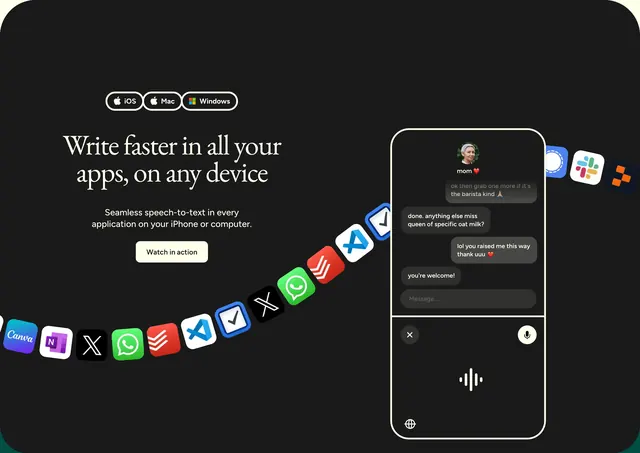
Dark split CTA with platform badges, serif headline, and a phone mockup showing voice-to-text over a curved ribbon of app icons.
Summary
A black full-bleed CTA that sells universal speech-to-text with platform pills, editorial headline copy, and a phone demo framed by a sweeping arc of third-party app logos.
Visual description
The section uses a near-black background in a left-copy, right-visual split. Top left, three outlined pill badges list iOS, Mac, and Windows with small platform icons. Below them, a large white serif headline reads "Write faster in all your apps, on any device" over a shorter sans-serif subline about seamless speech-to-text. A cream rounded button labeled "Watch in action" is the sole CTA. On the right, a white-bordered phone mockup shows a messaging thread in the upper half and a dark voice-capture UI below with an animated waveform, microphone control, close button, and globe icon. Behind and beneath the phone, a curved ribbon of colorful third-party app icons (including Canva, OneNote, X, WhatsApp, Todoist, VS Code, TickTick, and Slack) flows across the lower area, implying cross-app reach. Typography mixes elegant serif headlines with clean sans body copy on a high-contrast dark field.
Key takeaway
The app-icon ribbon is an efficient integration story without a logo grid or bullet list. Pairing a real in-context phone demo with platform badges answers "where does it work?" in one glance.
Reuse notes
Best for cross-platform utilities that need to feel native everywhere. The dark editorial treatment reads premium; the cream CTA pops cleanly. Needs recognizable partner or app icons to land the integration message.