Preview image. Unlock full-res
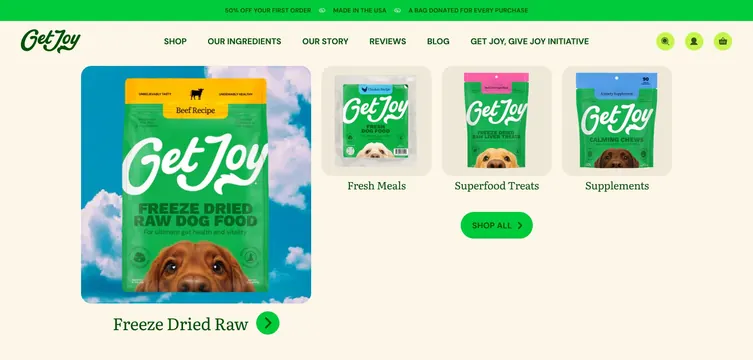
Open Shop mega menu with promo bar, nav row, one large hero category tile, three smaller product cards, and Shop All CTA on cream.
Summary
Get Joy Shop dropdown showing a green promo strip, standard nav, and a category grid with one large freeze-dried tile and three stacked smaller cards ending in Shop All.
Visual description
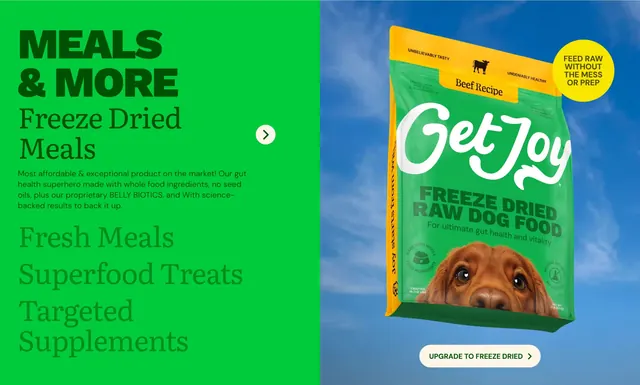
Top green announcement bar repeats three white uppercase promos separated by dot icons: 50% off first order, Made in the USA, and a bag donated per purchase. Below, cream header with green script logo left, centered uppercase nav links, and lime circular search, account, and cart icons right. Dropdown panel on cream shows a two-column category layout. Left, a large square card with sky background and floating freeze-dried beef bag; label Freeze Dried Raw in dark green serif with small green arrow circle. Right column stacks three narrower cream cards for Fresh Meals, Superfood Treats, and Supplements, each with product pack photography and serif labels. Wide green pill Shop All button with arrow sits below the right stack.
Key takeaway
Hero-sizing the lead category tile while stacking secondary lines in a sidebar mirrors merchandising priority inside navigation. Sky product photography inside menu cards keeps the dropdown feeling like a landing moment, not a link list.
Reuse notes
Reference for ecommerce mega menus with four or fewer top categories. Promo bar plus dropdown doubles conversion surface; watch total header height on laptop viewports. Serif category labels pair well with script logo and sans nav.
More navbar sections
See all






More like this
Keep what you find
A free account saves references to boards and can send you a weekly email of picks based on what you save.
To see every result, go Pro.