Preview image. Unlock full-res
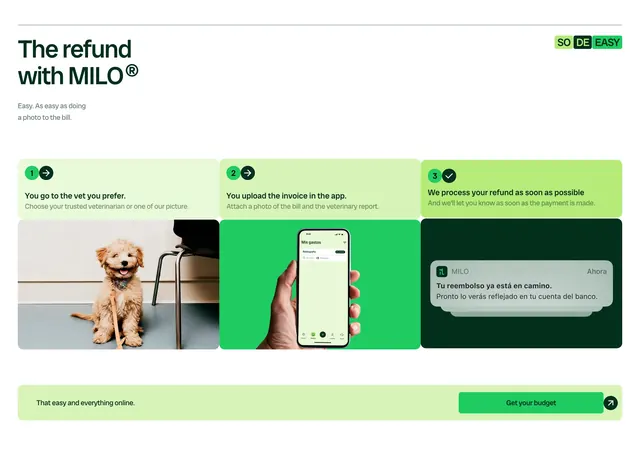
Step-by-step refund section with numbered green panels, photo and app mockups, and bottom budget CTA bar.
Summary
A refund explainer with three numbered columns progressing from vet visit to app upload to payment notification, ending in a full-width CTA strip.
Visual description
Light page with dark green headline "The refund with MILO" and subcopy about photographing the bill. "SO DE EASY" badge top right. Three columns each pair a tinted text panel with a visual below. Step one pale green panel with arrow icon 1 describes choosing your vet above a puppy photo. Step two medium green panel about uploading invoice above hand holding phone with expenses app. Step three bright green panel about processing refund above dark panel showing Milo push notification. Bottom pale bar reads "That easy and everything online" with green "Get your budget" button and arrow.
Key takeaway
Color-intensify each step panel so progress feels literal, not just numbered. Pair one real photo with one product UI shot to connect offline vet visits to digital reimbursement.
Reuse notes
Strong for fintech or insurance products with app-based claims. Step copy should stay short; detailed policy links belong elsewhere.
More process sections
See all



More like this


Keep what you find
A free account saves references to boards and can send you a weekly email of picks based on what you save.
To see every result, go Pro.