Preview image. Unlock full-res
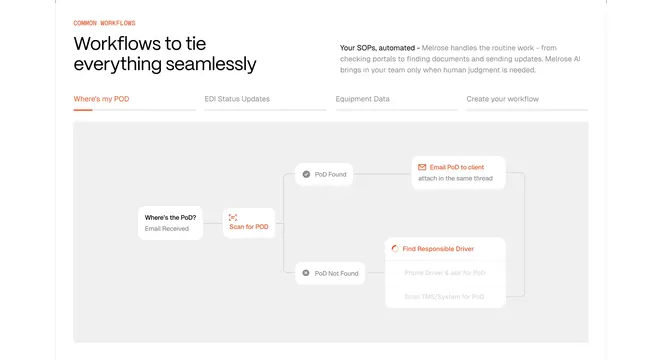
White workflows section with orange tabs and gray canvas flowchart for Where's my POD email automation paths.
Summary
Common workflows header introduces tabbed SOP automations with active Where's my POD flowchart from email trigger through scan, found, and not-found branches.
Visual description
White layout with orange COMMON WORKFLOWS label and black headline Workflows to tie everything seamlessly plus right gray copy on Melrose handling routine portal checks. Horizontal tabs include Where's my POD underlined orange, EDI Status Updates, Equipment Data, and Create your workflow. Gray box contains flowchart starting Email Received Where's the PoD node to Scan for POD orange icon, splitting to PoD Found path emailing client with attachment note versus PoD Not Found path with Find Responsible Driver spinner and gray sub-steps to phone driver or scan TMS.
Key takeaway
Tabbed real SOP diagrams make automation tangible for ops buyers. Orange highlights active steps inside an otherwise neutral flowchart palette.
Reuse notes
Strong for workflow or RPA products. Diagrams must stay readable at smaller widths; dense branches need simplification on mobile.
More process sections
See all



More like this
Keep what you find
A free account saves references to boards and can send you a weekly email of picks based on what you save.
To see every result, go Pro.