Preview image. Unlock full-res
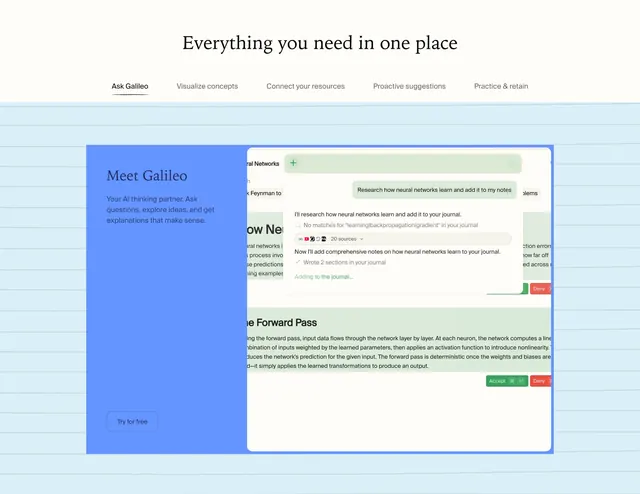
Tabbed capabilities section on ruled notebook paper with a split card showing a blue Galileo sidebar and an AI research chat overlay on a document mockup.
Summary
A notebook-themed tabbed feature block where the active "Ask Galileo" tab reveals a split product card with sidebar CTA and a live AI research session writing into a journal.
Visual description
Pale blue background with faint horizontal ruled lines mimicking notebook paper. Centered serif headline reads "Everything you need in one place." Below, a horizontal tab row lists five capabilities; "Ask Galileo" is active with a dark underline. A large rounded card dominates the section. Left column is solid medium blue (~35% width) with white serif "Meet Galileo" heading, white sans body copy about an AI thinking partner, and a bottom "Try for free" ghost button with light border. Right column shows a document UI about neural networks and the forward pass with green Accept and red Deny chips on suggested edits. A semi-transparent light-green chat overlay sits on the document: user bubble asks to research how neural networks learn and add notes; AI responds with search status, a row of source icons totaling 20 sources, and a completion message about writing two sections into the journal.
Key takeaway
Ruled paper background ties every tab to a study context without repeating notebook chrome in the card. The blue sidebar plus live product mockup makes abstract AI capability tangible in one frame. Progress states in the chat (search, sources, wrote sections) show agentic workflow clearly.
Reuse notes
Strong for AI study or research products with multiple capabilities to browse. Tabs need distinct mockups per state; five tabs is the practical upper limit before the nav feels crowded. Blue sidebar color anchors the active feature across tab switches.