Preview image. Unlock full-res
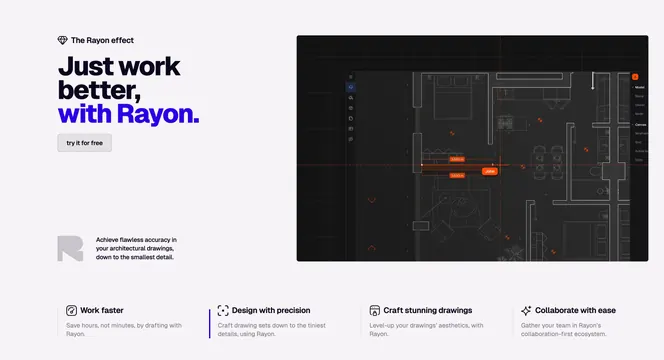
Light split features section pairing a bold left headline with a dark architectural CAD screenshot, over a four-column feature row.
Summary
A light features section that sets a bold black-and-blue headline against a dark architectural CAD canvas, then summarizes the value in a four-column icon row below. The contrast between the pale frame and the near-black product shot is the defining move.
Visual description
On the left, a small diamond-mark eyebrow reads "The Rayon effect" above an oversized three-line headline where the last line "with Rayon." switches to vivid blue. A pale ghost "try it for free" button sits under it, and lower down a faint R glyph anchors a short supporting paragraph. The right two-thirds is a dark architectural floor plan in a CAD editor, with a thin left toolbar, a right properties panel, orange measurement labels (3.500 m) and an orange "John" collaborator cursor. Beneath the whole block runs a four-column row, each column an outline icon, a bold label (Work faster, Design with precision, Craft stunning drawings, Collaborate with ease) and a line of muted copy; the second column carries a blue left accent bar.
Key takeaway
The tonal flip: a light page that drops a single dark, detailed product canvas to make the screenshot feel like a real workspace. The two-color headline (black plus one accent) is a cheap way to add emphasis without extra weight. The under-row of four icon features turns one hero shot into a full feature summary.
Reuse notes
Good for a technical or design tool that wants to show a dense interface without going fully dark on the whole page. Needs a genuinely rich product screenshot to justify the dark panel. The blue and orange accents must match the product UI or the section reads disjointed.