Preview image. Unlock full-res
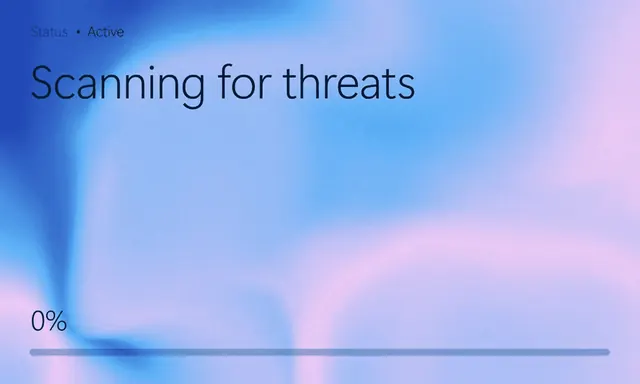
Minimal status screen with "Scanning for threats" over a blue and pink liquid gradient, a status line above and a 0% progress bar pinned to the bottom.
More like this
See all

Summary
A stripped-back product status screen where the entire background is a soft blue to pink gradient and the only interface elements are a label, a headline and a progress bar.
Visual description
The full field is a blurred gradient running from a deep cobalt patch at the top left through cornflower blue into pale lilac and pink at the right, with soft smoky forms sweeping through the middle. Top left, small grey type reads "Status . Active" with the word "Active" in a darker weight. Directly below it, "Scanning for threats" is set large in a light dark-navy sans-serif with generous letter spacing. The lower left corner holds "0%" in the same face at mid size, and a thin full-width horizontal bar sits beneath it, drawn in a translucent grey-blue with no filled portion. Nothing else occupies the frame.
Key takeaway
Treating a system state as brand canvas, with only three text elements and one rule on a full-bleed gradient, makes an ordinary progress screen feel designed rather than functional. Pinning the metric and bar to the bottom edge while the headline sits top left leaves the gradient a large uninterrupted middle.
Reuse notes
A good reference for loading, scanning or processing states where you want brand presence during dead time. The type is thin and low contrast against pale gradient areas, so a darker gradient stop or a heavier weight may be needed for accessibility. Only convincing at full-bleed sizes; in a small card the empty middle reads as a mistake.
More like this

Keep what you find
A free account saves references to boards and can send you a weekly email of picks based on what you save.
To see every result, go Pro.