Preview image. Unlock full-res
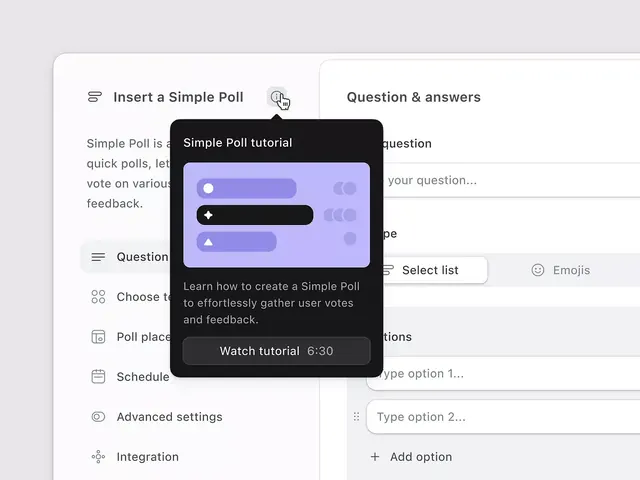
SaaS interface for creating polls with a dark tooltip tutorial demonstrating poll-type options on a light background.
Summary
A SaaS polling interface demonstrating form creation with a floating modal tutorial overlaid, using purple and indigo accents to highlight functionality.
Visual description
The layout is split two-column: the left shows poll creation options (Insert a Simple Poll, Question fields, Choose type, Poll placement, Schedule, Advanced settings, Integration), while the right panel displays a Question and Answers section with example input fields. Overlaying the center is a dark modal titled "Simple Poll tutorial" with a bright indigo background and white toggle/radio controls, describing how to create polls for gathering feedback. The overall palette is light gray background with black text, accented by purple/indigo components. A thin divider line separates the two main sections, and subtle icons accompany each form option.
Key takeaway
The floating instructional modal placed directly over the relevant UI section makes training feel contextual rather than removed. The purple accent applied strategically to form controls (toggles, radio buttons) creates visual hierarchy without overwhelming. Using sample data in the right column gives immediate previewing power.
Reuse notes
Strong pattern for onboarding users through complex form creation. Works well when the tutorial needs to point at a specific control. Pair with a dismiss button and allow skipping to avoid annoying returning users.
More like this

Keep what you find
A free account saves references to boards and can send you a weekly email of picks based on what you save.
To see every result, go Pro.