Preview image. Unlock full-res
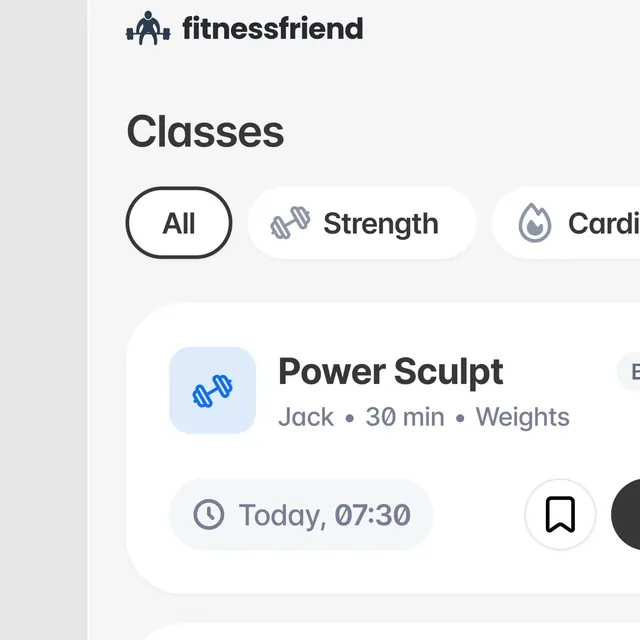
Fitness app screen showing a class directory with pill-shaped category tabs (All, Strength, Cardio) and stacked class cards listing trainer, duration, time, and equipment.
Summary
Fitness app screen for browsing workout classes, with pill-shaped filter tabs and stacked class cards displaying trainer, duration, equipment, and scheduled time.
Visual description
Light gray background with "fitnessfriend" logotype and app icon at top. Below, a bolded "Classes" heading introduces three pill-shaped tabs (All selected with dark outline, Strength and Cardio unselected, light fills). A featured class card shows: left-aligned dumbbell icon on light-blue rounded square background, class name "Power Sculpt" in bold sans-serif, instructor name "Jack" and duration "30 min" and equipment "Weights" in smaller gray text on one line, and "Today, 07:30" in a gray pill badge below. Bookmark and menu icons appear to the right. The whitespace is generous; the card has subtle gray border and rounded corners. Navigation elements (bars icon visible bottom-right) suggest additional screens.
Key takeaway
Pill-shaped category tabs offer intuitive, compact filtering without dropdown friction. The class card stacks text information (title, metadata, time) in a single scannable flow with icon cue on the left. The subdued blue background for icons provides visual interest without overwhelming the neutral palette.
Reuse notes
Strong pattern for wellness and fitness app dashboards. The tab filter works for any browsable list (recipes, workouts, lessons, events). Adapt the metadata line to your data (duration, difficulty, location, etc.). The muted palette conveys calm and approachability. Works especially well on iOS and Android-style apps.
More like this
Keep what you find
A free account saves references to boards and can send you a weekly email of picks based on what you save.
To see every result, go Pro.