Preview image. Unlock full-res
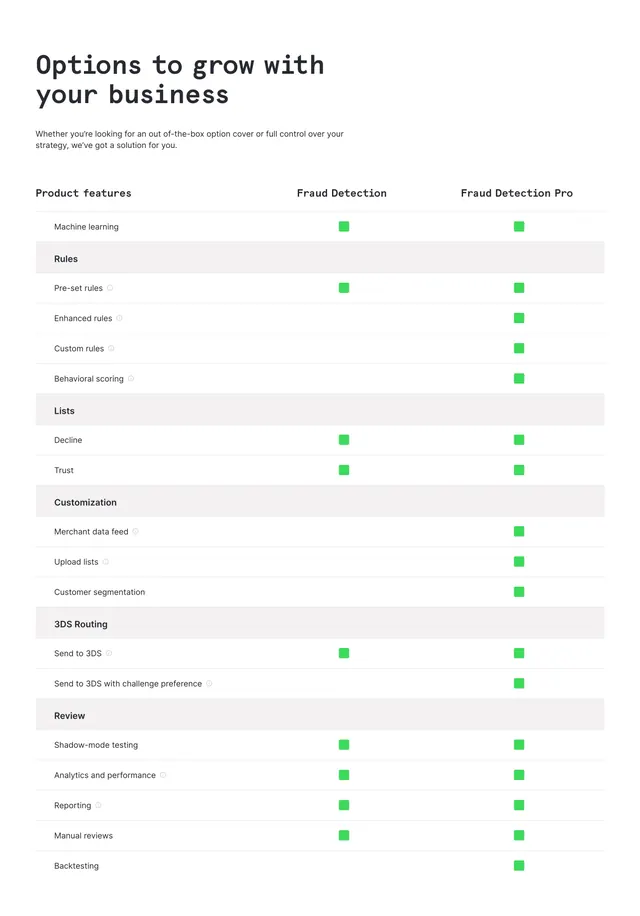
Light comparison table contrasting Fraud Detection and Fraud Detection Pro across rules, lists, customization, 3DS routing, and review features.
Summary
Product tier comparison table for fraud detection plans with grouped feature rows and green square indicators showing which capabilities each tier includes.
Visual description
White background. Top left: bold black headline "Options to grow with your business" and short intro paragraph. Three-column table: Product features left, Fraud Detection center, Fraud Detection Pro right. Category headers in light gray rows (Rules, Lists, Customization, 3DS Routing, Review). Feature names with small info icons; green squares mark inclusion per tier. Thin horizontal dividers between rows.
Key takeaway
Grouped categories inside a comparison table make long feature lists digestible. Green square markers feel fresher than standard checkmarks while staying readable.
Reuse notes
Ideal for SaaS or fintech upsell pages comparing base vs pro tiers. Table density suits technical buyers; may need mobile stacking elsewhere.
More comparison sections
See all

More like this


Keep what you find
A free account saves references to boards and can send you a weekly email of picks based on what you save.
To see every result, go Pro.