Preview image. Unlock full-res
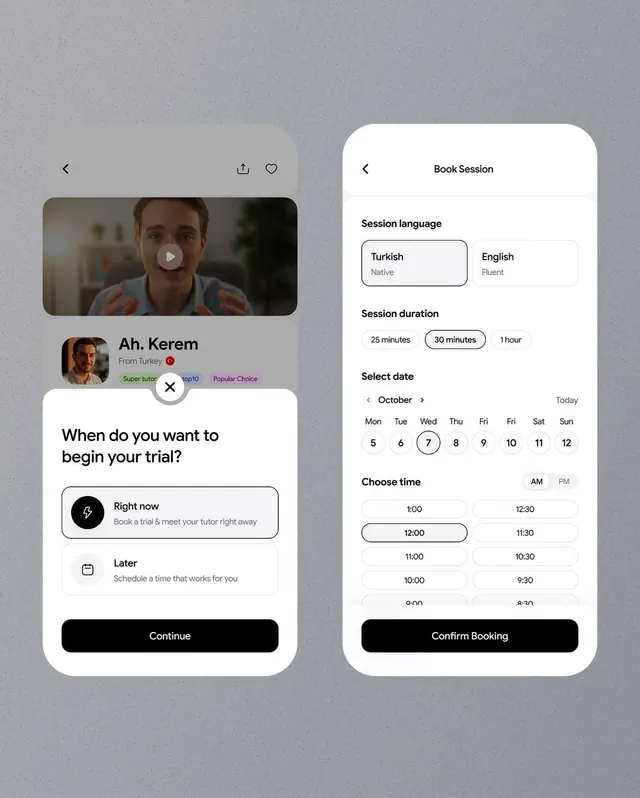
Mobile booking experience for a tutoring platform with two-screen flow: session scheduling with language selection and date/time picker, and a modal for immediate booking.
Summary
Mobile booking experience for a tutoring platform with two-screen flow: session scheduling with language selection and date/time picker, and a modal for immediate booking.
Visual description
Two distinct screens compose the flow. On the left: a tutor profile card with photo, name "Ah. Kerem" (from Turkey), badges ("Super tutor", "top10", "Popular Choice"), alongside a modal asking "When do you want to begin your trial?" with two options (Right now / Later) and a Continue button. On the right: a "Book Session" form with language selection (Turkish / English, pre-selected Turkish), session duration toggles (25/30 mins, 1 hour, with 30 minutes selected), a calendar for October with date 7 highlighted, time slots in a 2-column grid (AM/PM hours), and a "Confirm Booking" button. All containers use white or off-white backgrounds with black text, navigation arrows on cards, and clear visual hierarchy.
Key takeaway
The two-step confirmation pattern, especially the "When do you want to begin?" modal interceding before the full booking form - a smart gate to capture intent. The language-selector buttons as equal-weight toggles, and the time picker grid that shows availability without overwhelming the user.
Reuse notes
Strong template for education, tutoring, healthcare consultations, or any appointment-booking marketplace. The language selector translates well to services serving multilingual users. The immediate-vs-later branching reduces friction for eager users while keeping scheduling flexible for planners.
More like this
Keep what you find
A free account saves references to boards and can send you a weekly email of picks based on what you save.
To see every result, go Pro.