Preview image. Unlock full-res
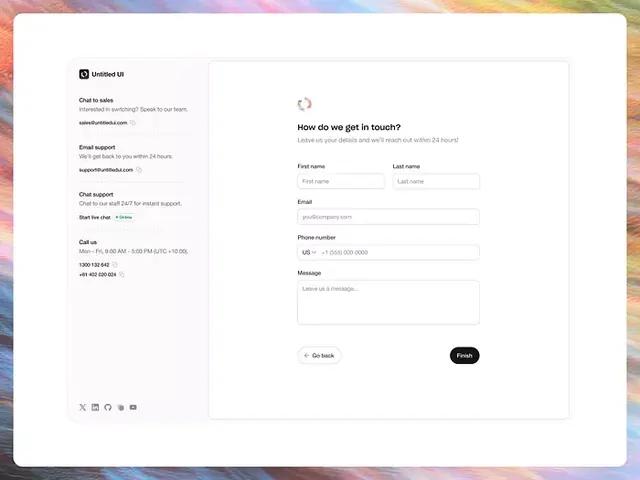
Contact form with split-panel layout separating support options on the left from a tabbed contact input on the right, using a colorful gradient background.
Summary
Contact form with a two-column layout offering multiple support channels simultaneously: chat, email, and phone options on the left sidebar paired with a lead-capture form on the right.
Visual description
Left sidebar houses contact options in a narrow column with a small logo at the top, followed by "Chat to sales" (with email address), "Email support" (with email and 24-hour promise), "Chat support" (with availability hours and phone number), and social media icons below. Right panel contains a tabbed form labeled "How do we get in touch?" with fields for First name, Last name, Email, Phone number (prefixed with US country code), and a Message text area. Primary call-to-action button reads "Send" in dark text on a filled background. Rounded corners throughout; white background with soft gray borders separating sections; subtle loading spinner visible above the form title.
Key takeaway
The dual-panel strategy presents multiple contact pathways without forcing a single funnel. The left sidebar's micro-hierarchy (bold labels, smaller text details) prioritizes information without cognitive overload. The soft border treatment and expansive whitespace make the form feel approachable rather than demanding.
Reuse notes
Effective for B2B support pages where establishing trust (immediate response times, multiple contact methods) matters as much as collecting data. Works well for SaaS customer-support or sales pages. Gradient background adds visual interest without distracting from the form itself.
More like this


Keep what you find
A free account saves references to boards and can send you a weekly email of picks based on what you save.
To see every result, go Pro.