Preview image. Unlock full-res
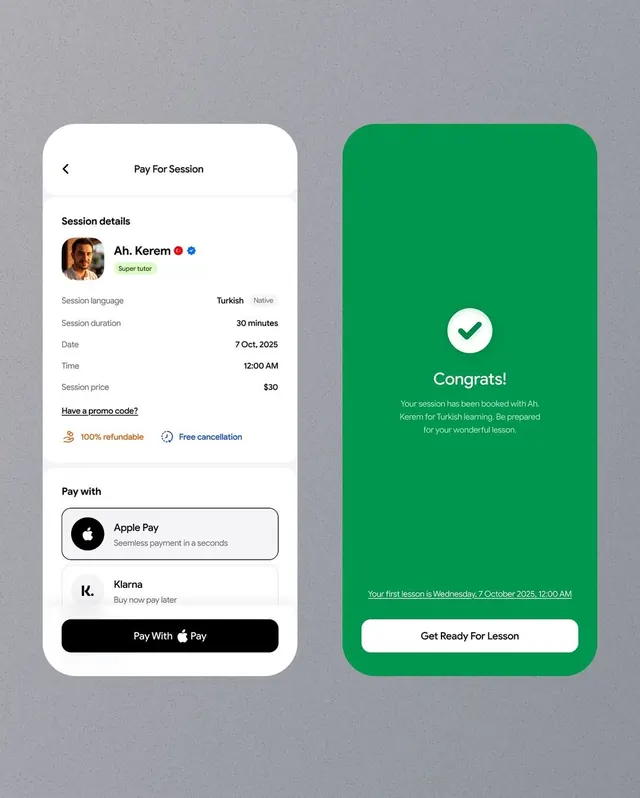
Lesson booking confirmation screens showing payment options on the left and success confirmation with session details on the right, in white and vibrant green.
Summary
A two-pane lesson booking confirmation flow presenting payment method selection on the left and a success state with session details on the right, using clean white cards against a neutral gray background.
Visual description
Left pane shows a white card titled "Pay For Session" with a session details section listing the tutor's photo, name, language (Turkish), duration (30 minutes), date (7 Oct 2025), time (12:00 AM), and price ($30). Below are benefits icons (100% refundable, free cancellation) and payment options including Apple Pay and Klarna, with a black Apple Pay button at the bottom. Right pane is a tall rounded green card with a centered white checkmark circle, the word "Congrats!" in white, confirmation copy in light green text, the lesson date and time underneath, and a white "Get Ready For Lesson" button anchoring the bottom. The overall composition uses generous padding, left-aligned labels, sans-serif typeface, and high color contrast between the neutral left side and the saturated green confirmation state.
Key takeaway
The side-by-side before/after pattern: neutral background pane shows the transaction details and decision point, while a bold color shift immediately confirms completion and preview the next step. The checkmark-in-circle is an economical confidence signal. Profile card with badges (Super tutor) creates social proof in the transaction context.
Reuse notes
Strong model for tutoring, consulting, or professional-services booking flows. Works well for any two-step transaction: review-and-pay on the muted left, confirmation-and-next-action on the vibrant right. Green is familiar for "go" states; swap the accent color to match your brand. The green card's height emphasizes the success state without adding noise.
More like this

Keep what you find
A free account saves references to boards and can send you a weekly email of picks based on what you save.
To see every result, go Pro.