Preview image. Unlock full-res
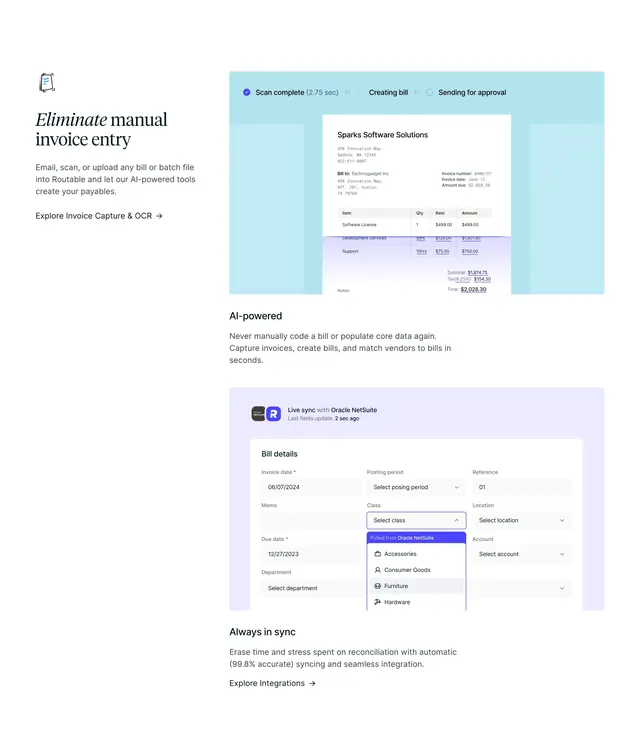
Stacked light feature blocks covering manual entry elimination, AI-powered coding, and NetSuite sync with product UI illustrations.
Summary
Stacked light feature blocks covering manual entry elimination, AI-powered coding, and NetSuite sync with product UI illustrations.
Visual description
Three stacked blocks on white. Top block: left side shows a small document icon, large serif headline Eliminate manual invoice entry, body copy about email, scan, or upload with AI payables creation, and an Explore Invoice Capture and OCR arrow link; right side sits on light blue with a progress bar (Scan complete 2.75 sec checked, Creating bill, Sending for approval) above a white invoice for Sparks Software Solutions with a purple horizontal scan line across line items. Middle block is text-only: bold sans AI-powered headline and body about never manually coding bills again. Bottom block pairs a lavender panel showing a Bill details form with Live sync with Oracle NetSuite status, last update timestamp, and an open Class dropdown labeled Pulled from Oracle NetSuite (Accessories, Consumer Goods, Furniture, Hardware) against a left text column headed Always in sync with copy on 99.8% accurate syncing and an Explore Integrations link.
Key takeaway
Alternating text and tinted UI panels walk through capture, intelligence, and sync without a carousel. The animated scan line on the invoice makes OCR tangible in a still screenshot. Calling out ERP field provenance (Pulled from Oracle NetSuite) turns integration into a visible trust signal.
Reuse notes
Strong for accounts-payable, document-AI, or ERP-connected SaaS pages. Each block needs a distinct UI moment; omit a block if you lack a credible integration story. Pastel panel colors keep dense forms readable on light pages.
More feature detail sections
See all
More like this
Keep what you find
A free account saves references to boards and can send you a weekly email of picks based on what you save.
To see every result, go Pro.