Preview image. Unlock full-res
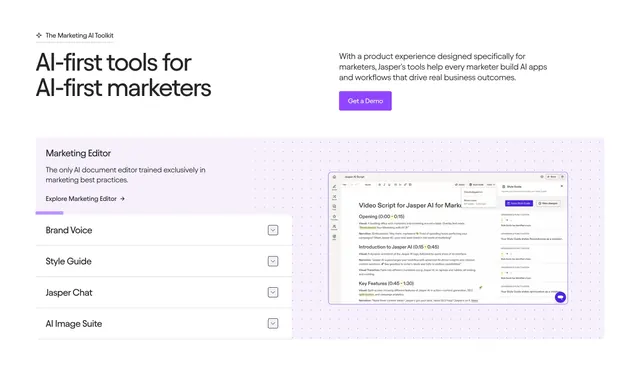
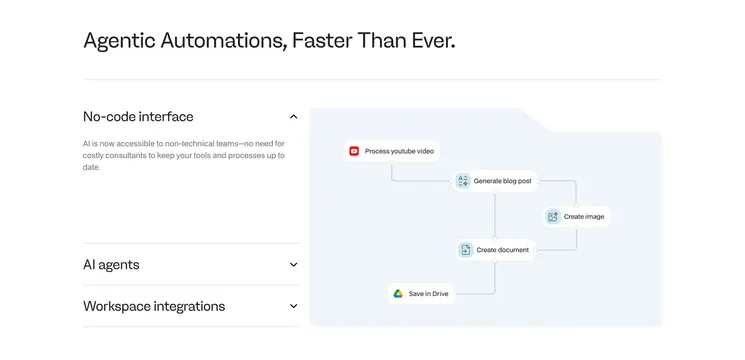
Split feature section with a tabbed accordion list on the left and a live product screenshot on the right, set on a lavender dotted panel.
Summary
A feature-detail block where a left-hand list of expandable feature tabs (Brand Voice, Style Guide, Jasper Chat, AI Image Suite) drives a large product screenshot on the right, all seated on a soft lavender dotted panel. The interactive list-to-preview pairing is the point.
Visual description
A split header runs an oversized two-line black headline "AI-first tools for AI-first marketers" on the left against an intro paragraph and a filled violet "Get a Demo" button on the right, under a small "The Marketing AI Toolkit" eyebrow. Below sits a wide rounded panel with a pale lavender fill and a faint dot texture. Its left half opens with a "Marketing Editor" title, a short description, and an "Explore Marketing Editor" link, with a violet progress underline marking the active item; beneath are four stacked rows (Brand Voice, Style Guide, Jasper Chat, AI Image Suite) each with a chevron toggle. The right half shows a detailed Jasper editor screenshot with a document, toolbar, and a Style Guide panel flagging grammar violations.
Key takeaway
Wiring a vertical list of feature tabs to a single large preview lets one section showcase several capabilities without stacking many screenshots. The violet progress underline on the active row signals an auto-advancing or selectable sequence. The dotted lavender panel softly contains both halves and gives the screenshot a branded frame.
Reuse notes
Use when several related features each deserve a real product view but you want to conserve vertical space. Needs genuinely legible, high-quality screenshots to carry the right half. The tinted panel ties it to a brand color; swap the fill to match your palette, and keep the active-state cue obvious so users know the list is interactive.
More feature detail sections
See all


More like this

Keep what you find
A free account saves references to boards and can send you a weekly email of picks based on what you save.
To see every result, go Pro.