Preview image. Unlock full-res
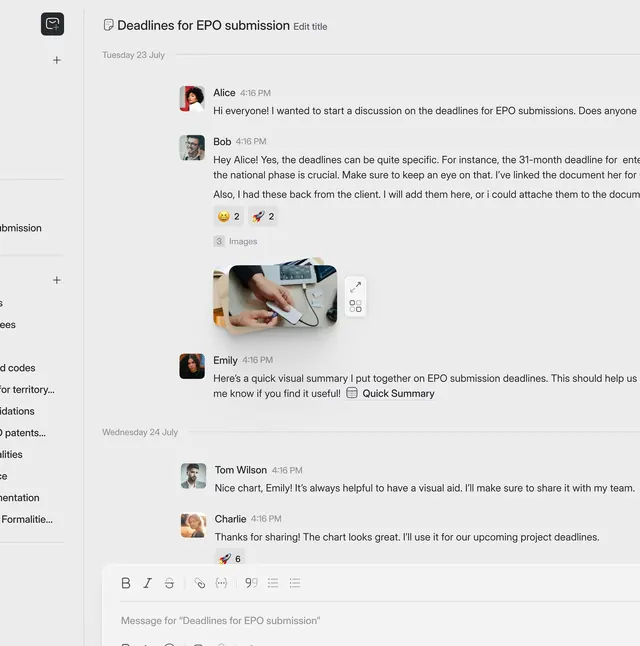
Vertically stacked threaded discussion interface showing avatars, timestamps, message bodies, reactions, and embedded images with a text composition box below.
Summary
Vertically stacked threaded discussion interface showing avatars, timestamps, message bodies, reactions, and embedded images with a text composition box below.
Visual description
A left sidebar menu (partially visible, dark background) anchors the view. The main content area is light gray background. At the top, a header reads "Deadlines for EPO submission" with an "Edit title" affordance. Beneath is a date label "Tuesday 23 July." Messages thread downward: each row shows a small circular avatar on the left (photo or initial), a name, timestamp, and multi-line body copy justified to the right. Message from Alice at 4:16 PM asks about EPO submission deadlines. Response from Bob at 4:16 PM (italicized detail text) supplies context. A small inset photo of a hand holding a device is inline-embedded with resize/expand icons. Emoji reactions (smiley, rocket) with counts sit below Bob's message. Another message from Emily references a "Quick Summary" with a table icon. Bottom edge shows a message composition box with bold, italic, strikethrough, link, and formatting toolbar icons plus a text input. Subtle dividing lines separate messages. Typography is sans-serif, small to medium weight. No color except the avatar images and muted teal accent on a sidebar button.
Key takeaway
Each message is self-contained (avatar + metadata + body in one visual unit) yet flows vertically as a cohesive thread. Emoji reactions and inline image embeds are unobtrusive (small, below text) but discoverable. The composition toolbar is simplified (only essential text styles + insert options) and does not dominate. Date and time labels group messages naturally without a rigid date separator.
Reuse notes
Essential template for project collaboration, legal/technical discussion threads, or internal team communication. The text-heavy layout and restrained color palette prioritize information over aesthetics; it suits enterprise, legal, or technical audiences. The muted sidebar on the left is typical of multi-section applications (like Slack, Teams, or project management tools). Consider adding reaction counts more visibly if reactions are frequent; conversely, de-emphasize them if rare.