Preview image. Unlock full-res
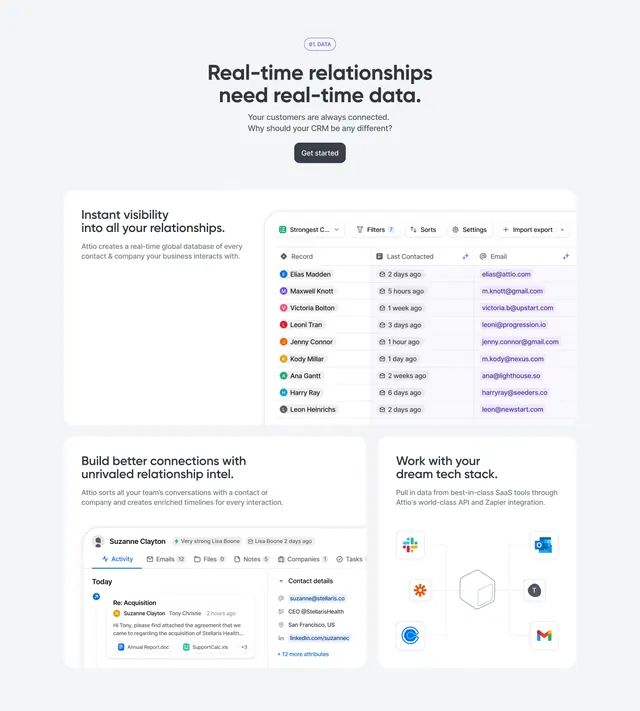
Light 01. DATA chapter with bento cards showing contacts table, enriched profile, and hub-and-spoke integration diagram.
Summary
Data section opening with purple 01. DATA badge, real-time relationships headline, and three white bento tiles for visibility, intel, and integrations.
Visual description
Very light gray background. Centered purple pill 01. DATA above headline Real-time relationships need real-time data. and gray subquestion about connected customers, plus dark Get started button. Bento layout below: wide top card with left copy about instant relationship visibility and right UI table showing Record avatars, Last Contacted timestamps, Email purple pills, filter and sort controls. Bottom-left card covers relationship intel with contact profile mockup for Suzanne Clayton including email thread and sidebar fields. Bottom-right card shows Work with your dream tech stack copy and center wireframe cube connected by dashed lines to Slack, Zapier, Calendly, Outlook, Typeform, and Gmail icons.
Key takeaway
Mixing one wide data-table tile with two square story cards explains platform breadth without three identical screenshots. Integration hub diagram communicates stack fit faster than logo lists alone.
Reuse notes
Strong for CRM, CDP, or ops platforms leading with data freshness. Dense UI captures need high resolution; bento asymmetry should stack top card first on mobile.
More feature detail sections
See all

More like this
Keep what you find
A free account saves references to boards and can send you a weekly email of picks based on what you save.
To see every result, go Pro.