Preview image. Unlock full-res
Light integrations section diagramming a central Outtake node wired between external-surface windows and internal SIEM/SOAR windows, over two supporting points.
Summary
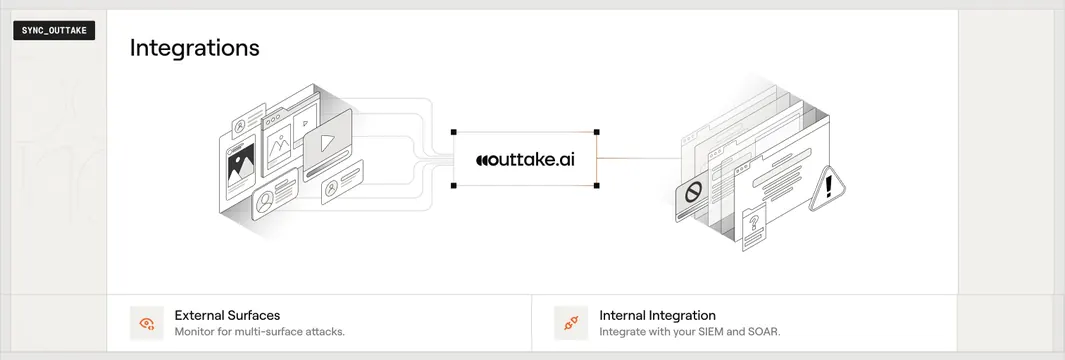
A light integrations section that renders the product as a central hub: the Outtake wordmark sits in a selected design-handle box wired on the left to external content surfaces and on the right to internal security tools. The wiring diagram is the entire concept.
Visual description
On a warm off-white ground, an "Integrations" heading sits top-left and a small "SYNC_OUTTAKE" monospace tag is pinned to the upper-left margin. The center holds the "outtake.ai" wordmark inside a thin rectangle with small black corner handles (as if selected in a design tool), highlighted with an orange edge. Curved gray connector lines run from the left, where a cluster of grayscale isometric windows (image cards, a video tile, profile cards) represents external surfaces, into the node; a single orange line runs from the node to the right, where a stack of isometric windows with a block/no-entry icon and a warning triangle represents internal tooling. A hairline rule beneath divides two supporting points, each a small orange line icon over a bold title and one-line gray descriptor (External Surfaces / Monitor for multi-surface attacks, Internal Integration / Integrate with your SIEM and SOAR).
Key takeaway
Drawing the product literally as a wired hub between "what it watches" and "what it plugs into" makes an integrations story instantly legible without a logo wall. The design-tool selection handles around the brand node, plus the single orange output line, tie the diagram to the brand's engineered, blueprint identity.
Reuse notes
Best for middleware, security, or data products that sit between external sources and internal systems. The isometric window clusters are bespoke illustrations, so it is art-heavy to produce. The two-point footer keeps the abstract diagram grounded in plain benefits; pairs cleanly with the rest of the Outtake technical set.