Preview image. Unlock full-res
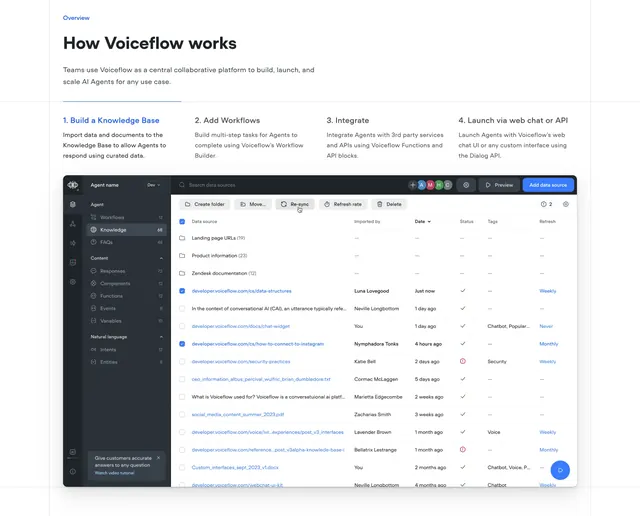
Light process section with four numbered steps across the top and a large knowledge-base dashboard screenshot below.
Summary
A light "how it works" section that lays out four numbered steps in a row, then shows a large product dashboard illustrating the first step. The numbered tab-like steps over one big screenshot define the pattern.
Visual description
A small "Overview" eyebrow sits above an oversized black heading "How Voiceflow works" with one line of grey sub-copy. Beneath a thin divider, four numbered steps run across in columns: "1. Build a Knowledge Base" (active, in blue), "2. Add Workflows", "3. Integrate" and "4. Launch via web chat or API", each with a short grey description. Below, a wide light product screenshot shows the Knowledge Base view of the app: a dark left sidebar with sections (Workflows, Knowledge, FAQs, Responses, Components, Functions, Intents, Entities), a top toolbar with "Create folder", "Move", "Re-sync" and "Add data source" controls, and a dense data table of data sources with columns for Imported by, Date, Status, Tags and Refresh. A small blue help bubble sits at bottom right.
Key takeaway
Treating the four steps as selectable tabs that each swap the product screenshot below, so one section teaches the whole workflow without scrolling through four mockups. Highlighting the active step in the brand color keeps state obvious.
Reuse notes
Ideal for explaining a multi-step product flow where each step maps to a real screen worth showing. Requires polished screenshots for every step to make the tabbing worthwhile. Works on light backgrounds and pairs well with a hero that already introduced the product.