Preview image. Unlock full-res
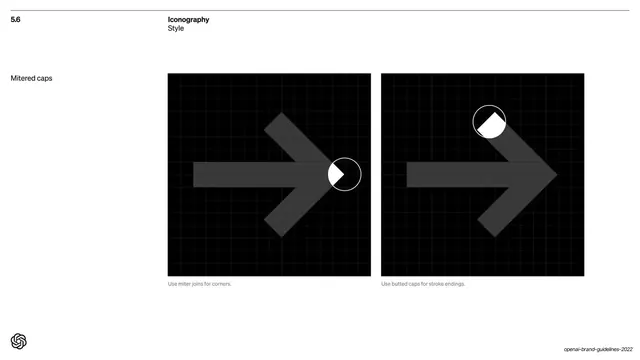
Iconography style page showing two black construction panels of an arrow icon on a grid, demonstrating miter joins for corners and butted caps for stroke endings.
Summary
The "5.6 Iconography / Style" page: an arrow icon shown on two black construction grids, the left labeled "Use miter joins for corners" and the right "Use butted caps for stroke endings," each with a magnifier circle highlighting the detail.
Visual description
White background with the "5.6 / Iconography / Style" header and a small "Mitered caps" label in the left column. Two equal black square panels fill the right two-thirds, each overlaid with a faint grid. Both show the same dark-grey rightward arrow constructed on the grid. The left panel has a white circular magnifier zooming the corner joint (miter join); the right panel has a magnifier zooming the stroke end (butted cap). Tiny grey captions sit beneath: "Use miter joins for corners." and "Use butted caps for stroke endings."
Key takeaway
Teaching icon construction rules on a visible grid with a circular magnifier that zooms the exact joint or cap being specified. The two-panel before/detail pairing isolates one rule per panel, so the geometry is unambiguous.
Reuse notes
A precise template for icon-system construction or any geometry/grid specification page. The magnifier-circle callout is reusable wherever a tiny detail (joint, terminal, corner radius) needs to be enlarged. The black-panel-on-white grid reads as engineering documentation.
From this deck: Iconography mitered and butted caps
View deck







More like this







Keep what you find
A free account saves references to boards and can send you a weekly email of picks based on what you save.
To see every result, go Pro.