Preview image. Unlock full-res
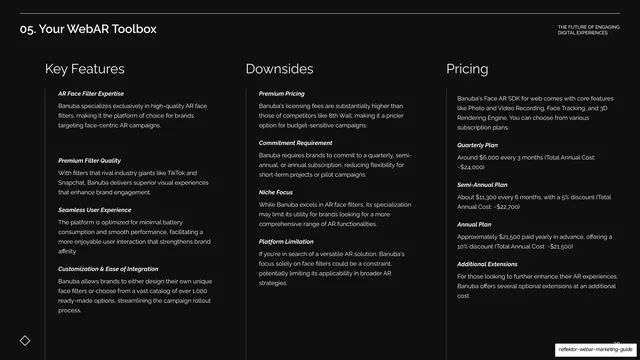
Dark three-column table comparing Banuba's Key Features, Downsides, and a multi-tier Pricing column with bold-italic sub-labels.
Summary
The Banuba comparison table: three columns headed Key Features, Downsides, and a fuller Pricing column listing several subscription tiers, all with bold-italic sub-labels.
Visual description
Near-black background under the "05. Your WebAR Toolbox" header, no oversized title. Three columns headed "Key Features", "Downsides", and "Pricing" in white sans are divided by faint vertical hairlines. Key Features lists four bold-italic entries (AR Face Filter Expertise, Premium Filter Quality, Seamless User Experience, Customization & Ease of Integration); Downsides lists four (Premium Pricing, Commitment Requirement, Niche Focus, Platform Limitation); the Pricing column is the fullest in the deck, listing Quarterly, Semi-Annual, Annual plans and Additional Extensions with dollar figures and annual totals. The diamond motif sits bottom-left.
Key takeaway
Letting the Pricing column expand when the model is genuinely tiered, while keeping the same three-column frame, shows the format scales from one line (earlier tools) to a full price menu without breaking. The reader instantly registers this as the priciest, most committed option simply by column density.
Reuse notes
Reuse as the standard breakdown after each spotlight. The same layout that held a one-line price elsewhere comfortably carries a multi-tier pricing menu here; let column length communicate relative complexity and cost.
From this deck: Banuba features, downsides, pricing
View deck








More like this




Keep what you find
A free account saves references to boards and can send you a weekly email of picks based on what you save.
To see every result, go Pro.