Preview image. Unlock full-res
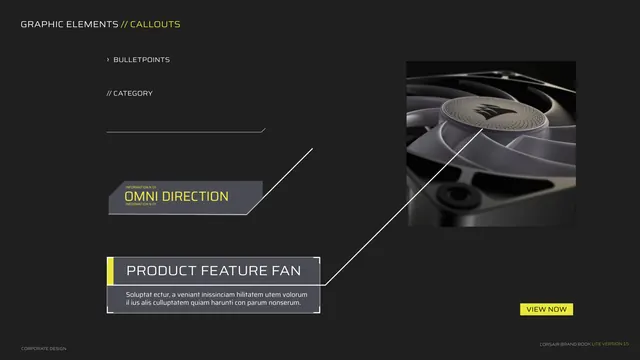
Shows the callout label kit, bulletpoints, angled "OMNI DIRECTION" tag and a product-feature label box over a fan render.
Summary
A second callout page focused on label styles: bulletpoint and category markers, an angled "OMNI DIRECTION" info tag, and a "PRODUCT FEATURE FAN" label box with a yellow tab, all linked by a leader line to a fan render.
Visual description
Dark grey background. Kicker "GRAPHIC ELEMENTS // CALLOUTS". Upper-left shows small text styles: a "BULLETPOINTS" line with a chevron, a "// CATEGORY" label, and a thin horizontal rule with an angled end. Mid-left an angled grey slab tag reads "OMNI DIRECTION" in yellow with tiny "INFORMATION N 01" labels. Lower-left a "PRODUCT FEATURE FAN" label box with a yellow left tab and placeholder copy. A thin leader line runs from the box up to a square product render of a Corsair fan (sail-mark on the hub) at top-right. A yellow "VIEW NOW" button sits bottom-right. Footer left.
Key takeaway
A small library of label and tag shapes (angled slab tag, tabbed label box, bulletpoint and category markers) that all share the black/grey/yellow logic, so annotations stay on-brand. The yellow filled "VIEW NOW" button as the single high-emphasis action.
Reuse notes
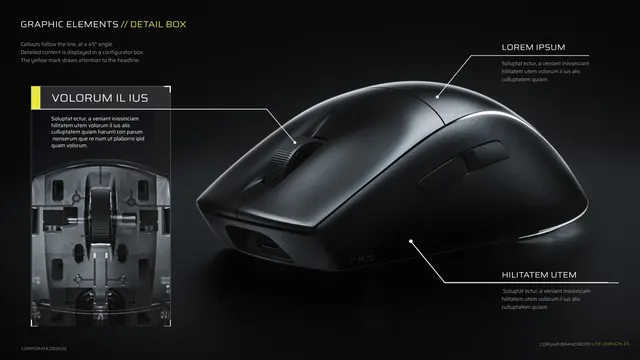
Pairs with the previous detail-box page as the second half of the callout toolkit. Reuse these label shapes for product pages, configurators and feature highlights. Keep yellow reserved for the one primary tab or button per composition so it stays a signal.