Preview image. Unlock full-res
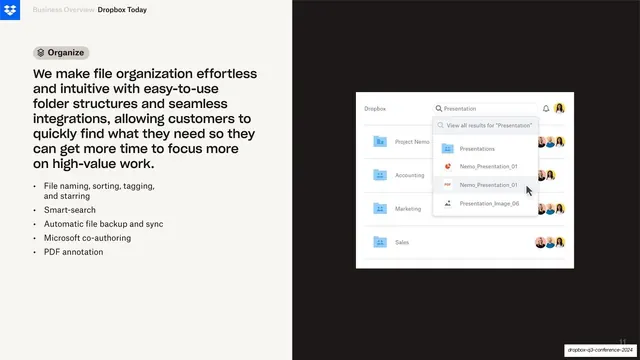
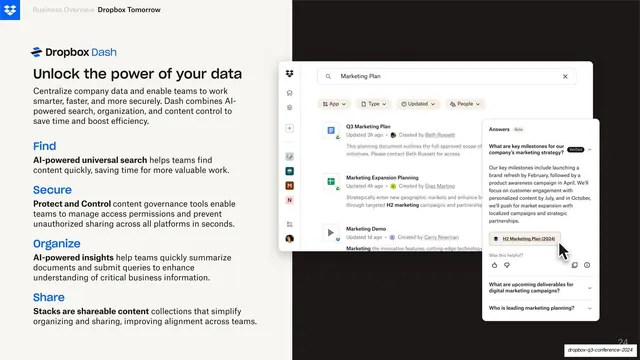
Split feature slide with an "Organize" pill, body copy and bullets on cream at left, and a Dropbox file-search UI mockup on near-black at right.
Summary
A feature slide split into a cream copy column and a near-black showcase panel, where a floating Dropbox file-list UI with an active search dropdown sits against the dark side.
Visual description
The canvas is divided roughly 45/55 into a warm off-white cream left and a near-black right. Top-left a Dropbox blue logo runs as a header beside greyed "Business Overview" and bold "Dropbox Today". The left column opens with a grey rounded pill reading "Organize" with a small stacked-layers icon, then a large multi-line sans-serif paragraph about effortless file organization, then five bulleted points (file naming, smart-search, backup and sync, co-authoring, PDF annotation). On the right, a white product mockup of a Dropbox file browser floats over the black: a search field reads "Presentation" with a results dropdown showing file and presentation entries with colored type icons, behind it a list of folders (Project Nemo, Accounting, Marketing, Sales) each trailed by overlapping circular member avatars. A page number sits bottom-right.
Key takeaway
The hard two-tone vertical split that lets a single product screenshot sit on a dark stage while all reading happens on calm cream. The pill label acts as a section tag so the eye knows the feature name before reading the paragraph.
Reuse notes
A strong template for a product or feature slide that needs to pair a wall of explanatory copy with one supporting UI shot. The dark panel makes a light app screenshot pop; swap the pill label and bullets per feature to run a whole series. Needs a genuinely legible UI capture to earn the showcase half.
From this deck: Organize feature with file-search UI
View deck




More like this



Keep what you find
A free account saves references to boards and can send you a weekly email of picks based on what you save.
To see every result, go Pro.