Preview image. Unlock full-res
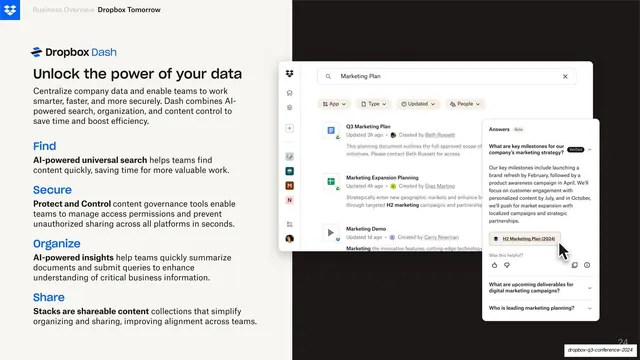
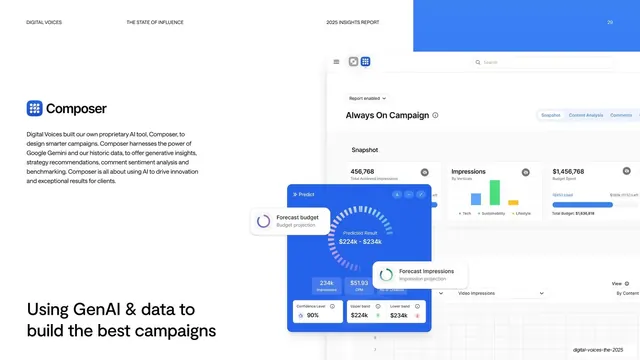
Split slide with a light left copy column of four blue-headed benefits beside a large Dash product screenshot bleeding off the dark right half.
Summary
A split product slide: a light left column of four blue-headed benefit blocks beside a large Dropbox Dash interface screenshot that bleeds off a dark right panel.
Visual description
The left two-fifths is the warm off-white base carrying the Dropbox logo, a muted "Business Overview / Dropbox Tomorrow" header, a "Dropbox Dash" lockup, a near-black headline "Unlock the power of your data", a short intro paragraph, then four stacked benefits each with a blue bold label (Find, Secure, Organize, Share) and a dark sentence with bolded lead-ins. The right three-fifths is a dark charcoal panel onto which a large Dash app screenshot is laid: a search bar querying "Marketing Plan", filter chips, document result rows, and a floating "Answers" AI panel with cited sources. The screenshot bleeds past the right edge. A faint slide number sits bottom-right.
Key takeaway
The split where copy lives on the light brand base and the product UI is staged on a contrasting dark panel and allowed to bleed off-canvas, implying a larger interface while the four blue-labeled benefits keep the value legible.
Reuse notes
A strong feature-detail layout when you have a genuinely good product screenshot to show. The dark staging panel makes a light-UI screenshot pop; reverse it for a dark UI. Bolded lead-ins inside each benefit keep the copy skimmable next to the dense capture.
From this deck: Unlock the power of your data product UI
View deck


More like this
Keep what you find
A free account saves references to boards and can send you a weekly email of picks based on what you save.
To see every result, go Pro.