Preview image. Unlock full-res
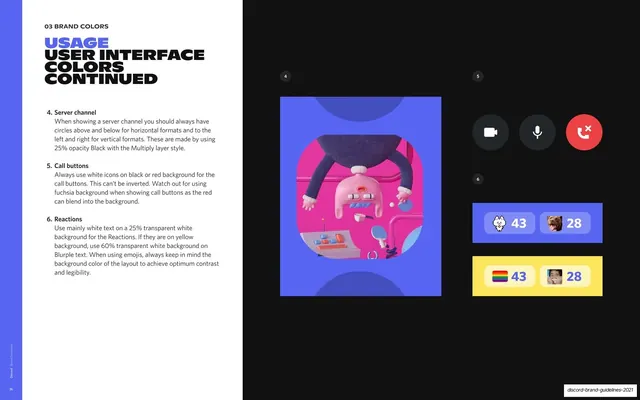
Continuation of the UI-color rules on a black page covering channel circles, call buttons, and reaction chips, with a 3D claymation key visual and blurple and yellow reaction examples.
Summary
The continued UI-color page: rules for channel circles, call buttons, and reaction chips on a black page, illustrated with a 3D claymation key visual and blurple and yellow reaction examples.
Visual description
Two-page 16:9 spread. The white left page has the "03 BRAND COLORS" eyebrow, a three-line headline "USAGE" (blurple) over "USER INTERFACE COLORS" and "CONTINUED" (near-black), continuing the numbered list with rules 4-6: server channel circles (25% opacity black with Multiply), call buttons (white icons on black or red, never inverted), and reactions (white text on 25% transparent white, or blurple text on 60% white over yellow). The black right page is numbered 4-6: a tall blurple-backed 3D claymation key visual of a clay figure with a ping-pong setup; a row of round call-button icons (video, mic in dark circles, a red hang-up button); and two reaction-chip examples, one on a blurple bar and one on a yellow bar, each with an emoji and a count (43, 28). The far-left blurple stripe carries the rotated caption and page 36.
Key takeaway
Spelling out exact opacity and blend-mode values for interface elements (25% black Multiply circles, transparent-white reaction chips) so the UI stays consistent. Showing the same reaction chip on two background colors to demonstrate the contrast-adjust rule.
Reuse notes
The second half of a UI-color spec, useful when interface rules run longer than one page. The precise opacity/blend specs are worth emulating for any component-level color documentation. Pairs directly with the preceding "user interface colors" page.
From this deck: User interface colors continued
View deck






















More like this




Keep what you find
A free account saves references to boards and can send you a weekly email of picks based on what you save.
To see every result, go Pro.