Preview image. Unlock full-res
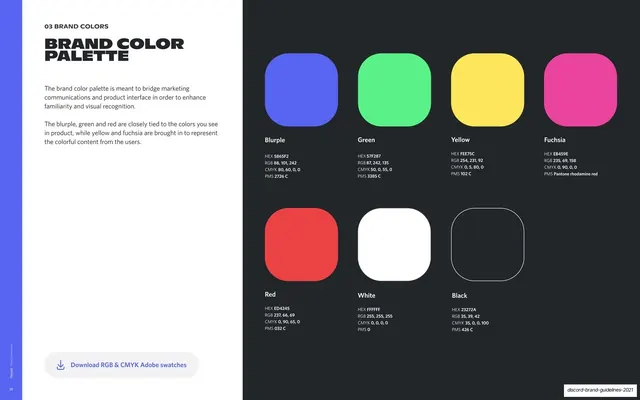
Full palette spread laying out seven rounded-square swatches (blurple, green, yellow, fuchsia, red, white, black) with full color values on a black page beside a white explainer and a download chip.
Summary
The full-palette page: seven rounded-square swatches with complete color specs laid out on a black page, with a short white intro and a swatch-download chip.
Visual description
Two-page 16:9 spread. The white left page has the "03 BRAND COLORS" eyebrow, a two-line headline "BRAND COLOR" over "PALETTE" in near-black, two short paragraphs on how the palette bridges marketing and product, and a rounded pill button "Download RGB & CMYK Adobe swatches" with a download icon near the bottom. The black right page holds a grid of seven rounded-square swatches: a top row of blurple, green, yellow, fuchsia, and a bottom row of red, white, and an outlined black square. Each swatch is labeled with its name and HEX, RGB, CMYK, and PMS values (for example Green HEX 57F287, Fuchsia HEX EB459E, Red HEX ED4245, Black HEX 23272A). The far-left blurple stripe carries the rotated caption and page 28.
Key takeaway
Presenting the whole palette as evenly spaced rounded swatches, each carrying its full four-format spec, with white and black shown as a filled and an outlined square. Adding a one-click "download swatches" affordance turns the reference into a usable asset.
Reuse notes
The canonical palette page for a brand guide. The consistent swatch shape ties it to the single-color hero page before it. Always include print and screen values; the outlined treatment for white/black is a neat way to keep pure values legible on a dark page.
From this deck: Brand color palette swatches
View deck































More like this






Keep what you find
A free account saves references to boards and can send you a weekly email of picks based on what you save.
To see every result, go Pro.