Preview image. Unlock full-res
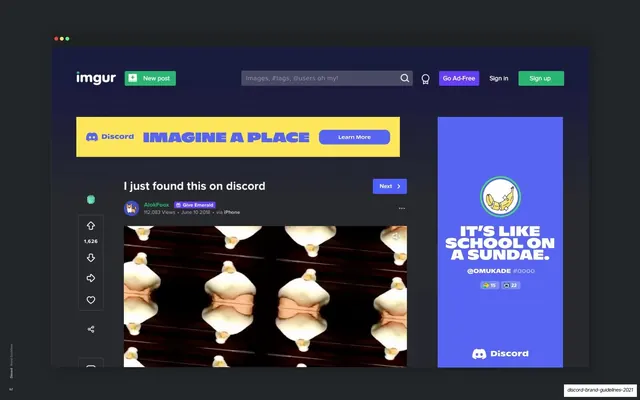
Browser mockup of a yellow Discord banner and a blurple right-rail skyscraper ad on an Imgur page, showing two simultaneous display slots.
Summary
A browser mockup placing two Discord ad units on an Imgur page at once, a yellow banner across the top of the feed and a blurple skyscraper down the right rail, showing combined display placement.
Visual description
A dark browser frame holds the dark-navy Imgur interface: the "imgur" wordmark, a green "New post" button, a search bar, and Sign in / Sign up controls up top. Across the content column sits a yellow Discord banner, the blurple Discord lockup on the left, an oversized blurple all-caps "Imagine a place", and a white "Learn More" pill button on the right. A user post ("I just found this on discord", an upvote rail, a meme image) runs below. On the right rail stands a tall blurple skyscraper ad: a circular avatar in a green ring, an oversized white all-caps headline "It's like school on a sundae.", a username handle, reaction pills, and the Discord lockup at the bottom.
Key takeaway
Running two different ad shapes on one page, a short CTA-led banner and a quote-led skyscraper, to show the kit covers both action and brand messaging in a single buy. The banner here is stripped to logo, headline, and a "Learn More" button, a leaner variant than the character-heavy formats.
Reuse notes
Useful for presenting a combined banner-plus-rail media plan in a brand or campaign deck. The two-units-on-one-publisher-page composition is reusable for any multi-slot proposal. Swap the host UI and the two unit types to match the placement being pitched.
From this deck: Imgur banner and right-rail placement
View deck

More like this

Keep what you find
A free account saves references to boards and can send you a weekly email of picks based on what you save.
To see every result, go Pro.