Preview image. Unlock full-res
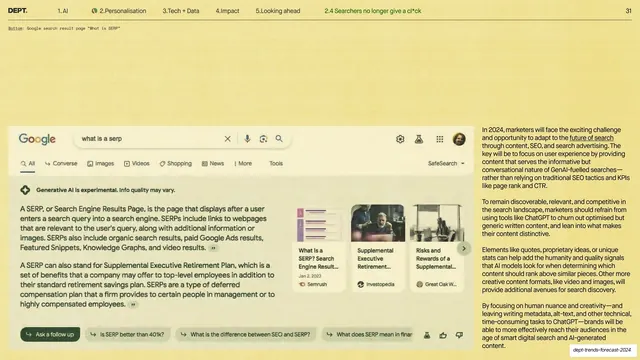
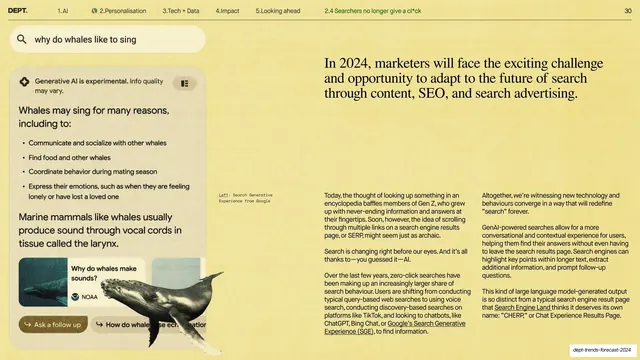
Pale-yellow slide built around a large Google search-results-page screenshot explaining what a SERP is, with two columns of body copy on adapting content for conversational search.
Summary
A pale-yellow slide built around a large Google search-results-page screenshot (a "what is a serp" query with featured answers and related cards) and two columns of body copy on adapting content for conversational, AI-generated SERPs.
Visual description
Warm pale-yellow ground with the standard header (2.Personalisation active, sub-section "2.4 Searchers no longer give a cl*ck", page 31). A small monospace caption sits top-left. The left two-thirds is a wide screenshot of a Google results page rendered as a flat white card: the Google logo and search bar with "what is a serp", a row of tabs (All, Converse, Images, Videos, Shopping, News, More, Tools), a generative answer defining a SERP, a carousel of related result cards with thumbnails, and a row of follow-up question chips. The right third is two columns of small dark sans-serif body copy with underlined links. No large headline.
Key takeaway
Making a single large, faithful interface screenshot the entire visual of the slide, with explanatory copy kept to the side, when the screen itself is the argument. The flat white card on yellow keeps the dense UI legible.
Reuse notes
Good for a slide whose point is "look how this interface now behaves." Works as a supporting slide without a headline because the screenshot is self-explanatory. Keep UI screenshots framed identically (flat card, monospace caption) across the deck for a consistent evidence style.
From this deck: Conversational SERPs (Google SERP screenshot + body)
View deck












More like this


Keep what you find
A free account saves references to boards and can send you a weekly email of picks based on what you save.
To see every result, go Pro.