Preview image. Unlock full-res
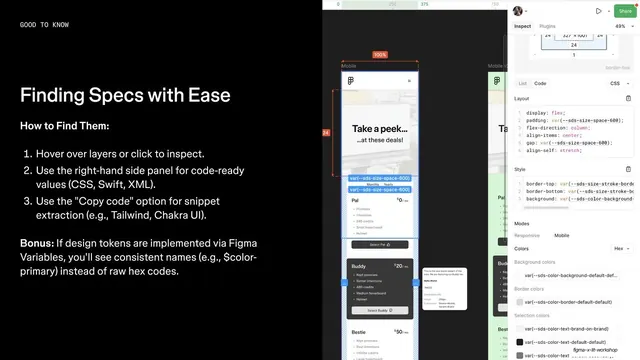
Split slide with a black left column of numbered inspect instructions and a full-bleed Figma Dev Mode inspect-panel screenshot on the right.
Summary
A dark how-to slide pairing a numbered three-step inspect routine on the left with a real Figma Dev Mode inspect-panel screenshot bleeding off the right edge.
Visual description
Black background. A tiny all-caps monospaced eyebrow "GOOD TO KNOW" runs along the top left. Below it a white oversized headline "Finding Specs with Ease", then a bold sub-line "How to Find Them:". A numbered list (1-3) in white sans-serif explains hovering to inspect, using the right-hand side panel for code-ready values, and the "Copy code" snippet option (CSS, Swift, XML, Tailwind, Chakra UI). A "Bonus:" note in bold closes the column, about design tokens surfacing consistent variable names instead of raw hex. The right third is a Figma Dev Mode capture: an Inspect panel showing Layout CSS, Style code, color modes, and a pricing-card design behind it.
Key takeaway
The discipline of one big headline plus a short numbered procedure on a black field, with the supporting product screenshot pushed off-canvas so it reads as evidence rather than the subject. The monospaced all-caps eyebrow signals "technical content" instantly.
Reuse notes
A clean template for any developer-tool or workflow slide that teaches a short procedure. Works well in a sequence of dark how-to slides. Needs a genuine product screenshot on the right to carry the visual weight; the off-edge crop only works at full bleed.
From this deck: Finding Specs with Ease, numbered how-to over Dev Mode capture
View deck



















More like this







Keep what you find
A free account saves references to boards and can send you a weekly email of picks based on what you save.
To see every result, go Pro.