Preview image. Unlock full-res
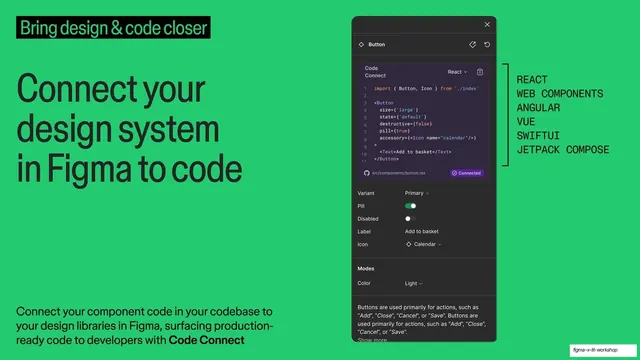
Green Code Connect slide with an oversized headline left, a Figma Button code-mapping panel center, and a list of supported frameworks right.
Summary
A green Code Connect slide: an oversized headline left, a Figma component panel showing a Button mapped to React code center, and a vertical list of supported frameworks right.
Visual description
Saturated green (#2ECC71) full bleed. Top-left a black highlight bar with green text reads "Bring design & code closer". A large black headline stacks "Connect your design system in Figma to code". Bottom-left body copy explains connecting component code to Figma libraries with Code Connect. Center sits a dark Figma component panel for a "Button" showing a Code Connect snippet (React import and JSX props), variant toggles (Pill, Disabled), and a "Connected" badge. To its right, a monospaced all-caps framework list runs vertically: REACT, WEB COMPONENTS, ANGULAR, VUE, SWIFTUI, JETPACK COMPOSE, bracketed as one set.
Key takeaway
Placing the realistic component panel in the center and annotating it with a plain monospaced list of supported platforms, bracketed like a code array. It communicates breadth ("works with all these") without a busy logo wall.
Reuse notes
A precise template for a developer-facing capability that spans multiple frameworks. The bracketed mono list is a tidy alternative to framework logos. Keep it inside the green theme run so the highlight bar threads it to the surrounding slides.
From this deck: Connect your design system in Figma to code, Code Connect slide
View deck



More like this


Keep what you find
A free account saves references to boards and can send you a weekly email of picks based on what you save.
To see every result, go Pro.