Preview image. Unlock full-res
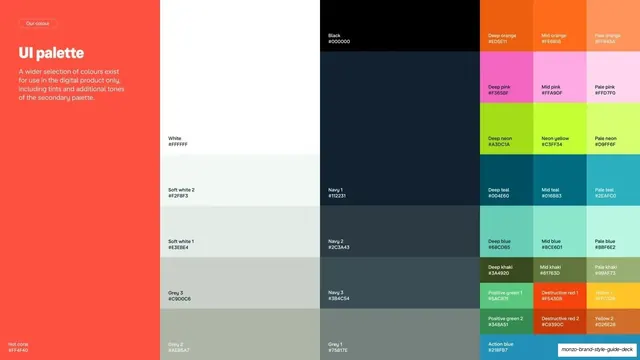
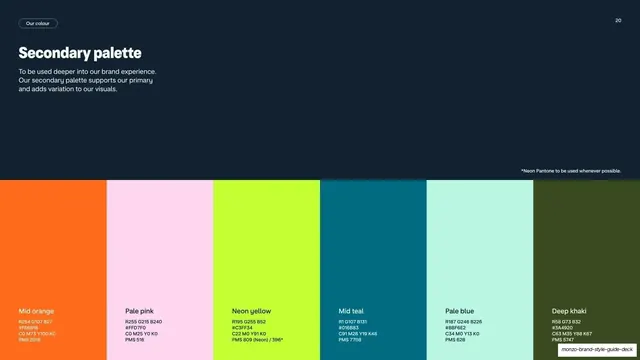
Full-bleed product UI palette laid out as a colour-block grid, every tile labelled with its name and hex code, set against a coral left panel.
Summary
The extended digital-product palette shown as an edge-to-edge grid of named, hex-coded colour tiles, anchored by a coral panel of intro copy.
Visual description
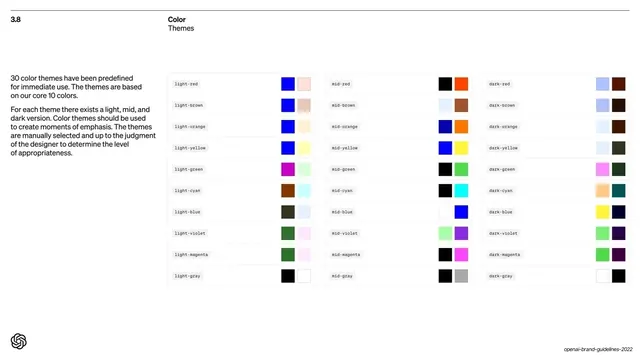
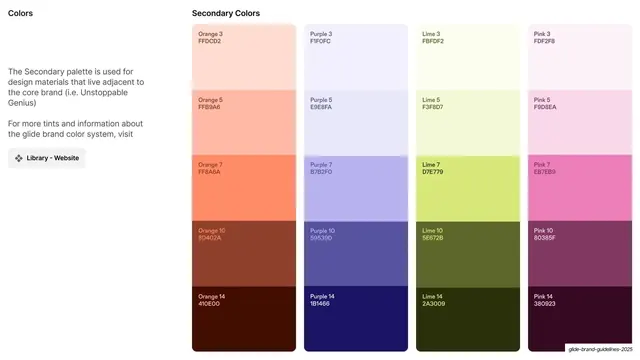
A coral panel on the far left holds a "Our colour" pill, the "UI palette" heading, and a short note that this wider selection exists for digital product only. The rest of the slide is a full-bleed grid of colour blocks of varying heights: large white, soft-white, grey, black and navy tiles on the left, then narrower columns of orange, pink, neon, teal, blue and khaki tints plus semantic colours (positive green, destructive red, yellow, action blue). Every tile carries its name and hex value in small white type, with the coral "Hot coral #FF4F40" pinned in the lower-left.
Key takeaway
A self-documenting design-token sheet: one screen captures an entire UI palette with names and hex codes, ready to hand to engineers. Mixing tile sizes packs many values in without a rigid table.
Reuse notes
The canonical "UI palette / colour tokens" page for a product design system inside a brand guideline. Naming plus hex on every tile makes it directly translatable to code variables. Best kept distinct from the marketing palette pages so the digital-only scope stays clear.
From this deck: Monzo UI palette with hex codes
View deck


More like this
Keep what you find
A free account saves references to boards and can send you a weekly email of picks based on what you save.
To see every result, go Pro.