Preview image. Unlock full-res
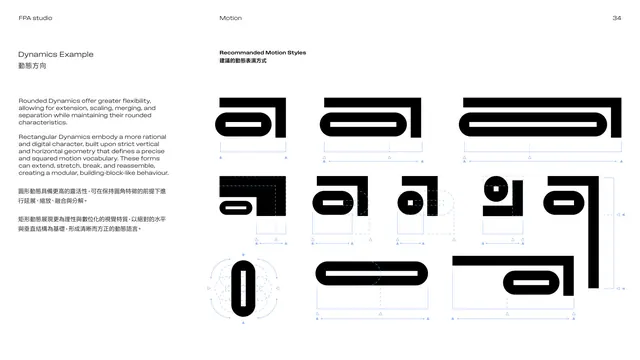
Motion-example page showing recommended ways the a icon extends, opens and morphs, as a grid of annotated black icon frames.
Summary
Recommended motion styles: a grid of the "a" icon in different transformation frames, extending horizontally, opening its counter, and morphing, with blue motion annotations showing the recommended directions.
Visual description
White page. The left column restates the two motion families in English over Chinese. The right side, headed "Recommended Motion Styles", is a grid of solid black "a" icons each in a different state of transformation: the icon stretching wider, its inner bar elongating, its counter opening and closing, and a vertical 0-like form. Thin blue arrows, dashed guide boxes and tick marks annotate each frame to show the recommended motion path and extent. Black icons, blue annotations on white.
Key takeaway
Annotating each motion frame with directional arrows and guide boxes turns abstract "the logo can move" into concrete, repeatable transformations. Anchoring all motion to the icon keeps the system tightly branded.
Reuse notes
A clear way to brief animators in a static document: show start/end states with directional annotations. Reuse the annotated-frame grid. Pairs with the misuse and motion-curve pages that follow.
From this deck: Dynamics example, recommended motion
View deck

More like this


Keep what you find
A free account saves references to boards and can send you a weekly email of picks based on what you save.
To see every result, go Pro.