Preview image. Unlock full-res
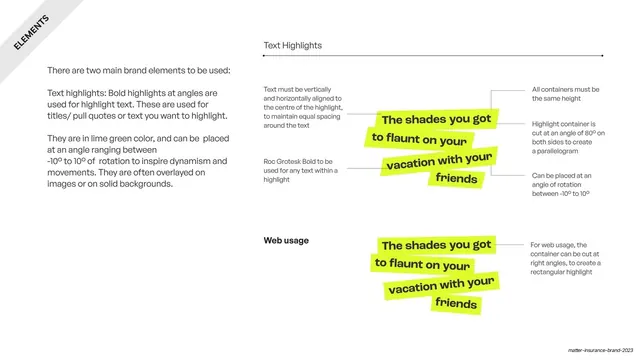
The lime text-highlight element specified twice, an angled parallelogram version and a right-angle web version, with callout annotations on alignment, height and rotation.
Summary
Specifies the lime-green text highlight, the brand's second signature element, in two cuts: an angled parallelogram for general use and a square-cut rectangle for web, both fully annotated.
Visual description
White slide with a rotated "ELEMENTS" corner banner. A left text column explains that bold lime highlights set at -10 to 10 degrees mark titles and pull quotes. The right side is split into two specimens under thin rules. "Text Highlights": a four-line pull quote ("The shades you got to flaunt on your vacation with your friends") in heavy black sans, each line wrapped in a tilted lime parallelogram cut at 80 degrees. Leader lines point to rules: all containers equal height, centered text, parallelogram cut, rotation -10 to 10 degrees, Roc Grotesk Bold. Below, "Web usage": the same quote with the highlights cut at right angles into rectangles, annotated for web.
Key takeaway
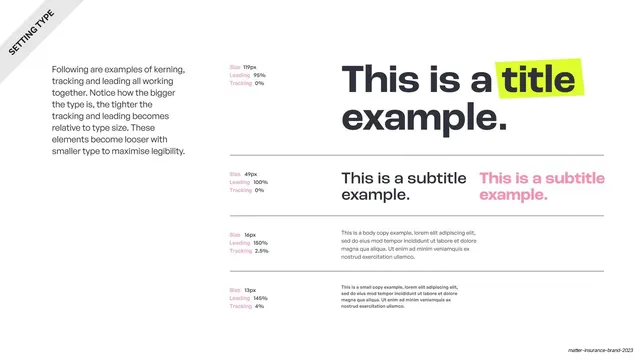
Treating a highlighter mark as a controlled brand element with a defined skew angle, a tight rotation range and a separate right-angle web variant. The stacked-lines-each-highlighted treatment is an easy, energetic headline device.
Reuse notes
A model page for any "expressive but rules-bound" graphic accent. The print-vs-web variant split is a practical detail worth copying. Lime-on-black is high energy; check contrast if you change the highlight color. Pairs with the type and tape element pages.
From this deck: Matter text highlights element
View deck



More like this
Keep what you find
A free account saves references to boards and can send you a weekly email of picks based on what you save.
To see every result, go Pro.